Vue lecture

Samsung Galaxy Z Fold 8 Ultra and Fold 8: Full breakdown before launch

Samsung is heading to London on July 22 for Galaxy Unpacked, and this year the Fold lineup is different: two book-style foldables at the same event. The Galaxy Z Fold 8 Ultra builds on everything the Z Fold 7 started, with a bigger battery, faster charging, and upgraded cameras. The Galaxy Z Fold 8 is an entirely new shape, shorter and wider, built around a 4:3 inner display that sits closer to a small tablet than a phone. 

Here is everything we know about both, before Samsung makes it official.

When and where

Samsung is expected to hold Galaxy Unpacked on July 22, 2026, in London. Korea Economic TV was the first outlet to report the date, and it has since been confirmed by Android Police, SamMobile, Android Authority, and Tom’s Guide. This will be Samsung’s first summer Unpacked event in the UK. Samsung has not issued an official media advisory as of mid-June 2026.

Pre-orders are expected to open the same day as the announcement. If Samsung follows its usual pattern, you should be able to buy both phones in the first week of August 2026, roughly two weeks after the event.

Three foldable phones are expected at the event, alongside the Galaxy Watch 9 series and what is being reported as Samsung’s first Galaxy Glasses (a Gemini-powered audio device made with Gentle Monster, no display):

  • Galaxy Z Fold 8 Ultra (traditional tall book foldable)
  • Galaxy Z Fold 8 (new wider, shorter 4:3 foldable)
  • Galaxy Z Flip 8
  • Galaxy Watch 9 series

Why this launch matters more than usual

Apple’s first foldable phone, widely referred to as the iPhone Fold or iPhone Ultra, is expected to arrive at Apple’s September 2026 event. Bloomberg’s Mark Gurman reported in April 2026 that it is on track to launch alongside the iPhone 18 Pro and Pro Max, with a starting price exceeding $2,000 in the US. Analyst Ming-Chi Kuo projects the price landing between $2,000 and $2,500, with Apple shipping 3 to 5 million units in its first year. It is expected to use a wider 4:3 form factor.

Samsung’s July 22 launch gives both Fold devices roughly a two-month window in the market before Apple ships a single unit. That means two months of reviews, accessories, trade-in deals, and carrier promotions before anyone can compare them side by side. Samsung chose London for this event as well, a move seen as a direct entry into one of Apple’s strongest premium markets.

Samsung Galaxy Z Fold 8 Ultra

The Galaxy Z Fold 8 Ultra is the phone Z Fold 7 owners have been waiting for. It keeps the same tall book-style form factor but adds a meaningfully larger battery, faster charging, and the most significant camera upgrade the Fold line has ever seen. Here is what we know.

Specs

1. Design

The overall shape stays the same as the Z Fold 7. Renders from SamMobile put the dimensions at 158.4 x 143.2 x 4.5mm unfolded and 158.4 x 72.8 x 9mm folded. There is a conflict on thickness: tipster Ice Universe says the unfolded thickness drops slightly to 4.1mm. Both figures come from different streams, so treat the exact as unsettled until Samsung announces.

Key design details:

  • Weight: 215g, the same as the Z Fold 7 (per Ice Universe), despite the larger battery inside
  • IP48 rating for dust and water resistance
  • Aluminum frame with Gorilla Glass Victus 2 on the cover
  • Side-mounted fingerprint reader
  • S Pen support: expected to be dropped. Ice Universe reported in May 2026 that neither the 2026 Fold will support the S Pen. No credible supply-chain source has contradicted this. The digitizer was already removed starting with the Z Fold SE, so this fits Samsung’s thinness direction
  • Color options: not yet known

2. Display

The Z Fold 8 Ultra keeps the same display sizes as the Fold 7. Both panels use LTPO OLED technology with adaptive 1-120Hz refresh:

  • Cover display: 6.5-inch LTPO OLED, Full HD+, up to 2,600 nits
  • Inner display: 8-inch LTPO OLED, QHD+, HDR10+, up to 2,600 nits
  • The inner panel is reported to use a dual-layer Ultra-Thin Glass structure with a laser-drilled metal support plate

On the crease: This is the most contested detail. Ice Universe said in May 2026 that the crease will not improve significantly over the Z Fold 7 and that there is no Privacy Display. A separate SamMobile report suggests crease control could come close to the OPPO Find N6, which is nearly invisible. These two positions conflict. The consensus across most outlets is that the crease will improve by roughly 20%, but the phone will not be crease-free.

On the CES 2026 “Mont Flex” panel: Samsung Display showed a genuinely crease-free foldable OLED panel at CES 2026. Samsung told The Verge it is an R&D concept with no fixed commercialization timeline. The weight of current information suggests this panel will not ship on the Fold 8 generation.

3. Performance

  • Chipset: Snapdragon 8 Elite Gen 5 for Galaxy, globally. No Exynos variant has been reported for the Fold line
  • RAM: 12GB on the 256GB and 512GB models; 16GB on the 1TB model
  • Storage: 256GB, 512GB, and 1TB. No microSD slot
  • Connectivity: 5G, Wi-Fi 7, Bluetooth 6.0, UWB, NFC, USB-C (USB 3.2 Gen 1)

4. Camera

The camera is where the Z Fold 8 Ultra makes its biggest leap. The ultrawide upgrade alone closes a gap that has been criticized across four Fold generations:

  • Main: 200MP with OIS, retained from the Z Fold 7 and in the same sensor family as the Galaxy S26 Ultra
  • Ultrawide: upgraded from 12MP to 50MP. This is the headline change. Source: SamMobile (via Tech Maniacs), corroborated by GSMArena, OnLeaks, and Digit
  • Telephoto: 10MP with 3x optical zoom and OIS, carried over from the Fold 7
  • Front cameras: 10MP on both the cover and inner displays. The cover punch-hole is reported to shrink from 3.7 mm to 2.5 mm
  • Video: 4K at 60fps across all cameras, 8K at 30fps on the main and ultrawide

5. Battery and charging

The battery is the other major story. Samsung held the Fold line at 4,400mAh from the Z Fold 3 through the Z Fold 7. That changes with the Fold 8 Ultra:

  • Battery: 5,000mAh, up from 4,400mAh. Multiple independent sources agree on this figure
  • Wired charging: 45W, up from 25W
  • Wireless charging: up to 20W Qi2.2, plus 4.5W reverse wireless (per SamMobile; some reports still cite 15W as the cap)

6. Software

  • Ships with Android 17 and One UI 9 out of the box
  • Galaxy AI suite: Photo Assist, Portrait Studio, Generative Edit, Now Brief, Now Bar, Samsung Internet multi-window improvements
  • Gemini Intelligence: expected to debut commercially on the Fold 8 and Flip 8 (per Seoul Economic Daily, via 9to5Google). This is agentic AI that automates tasks across multiple apps
  • Seven years of OS updates and security patches

7. Price

US pricing was leaked by tipster TheGalox in late March and early April 2026, corroborated by SamMobile and SammyFans:

  • 256GB (12GB RAM): $1,999
  • 512GB (12GB RAM): $2,199
  • 1TB (16GB RAM): $2,499

The $1,999 entry price is unchanged from the Z Fold 7’s original launch price. The 512GB and 1TB tiers are roughly $80 to $90 higher than the Fold 7’s original tags.

On the $2,700 claim: Korean outlet NewsPim reported in May 2026 that the 512GB model may cost $2,300 to $2,400 in South Korea, and the 1TB model could exceed $2,700. This is driven by rising memory costs. SammyFans, citing Samsung disclosures, reported that mobile memory prices more than doubled year-over-year, rising 107%. These figures apply to the Korean market and may not translate directly to US pricing. Document the $1,999/$2,199/$2,499 US structure as the most credible position, with the Korean escalation as a documented risk.

Samsung is holding the $1,999 entry price flat partly because Apple’s foldable is expected to launch at $2,000 or above. Raising the price now would hand Apple a competitive opening before it ships a single unit.

Samsung Galaxy Z Fold 8

The Galaxy Z Fold 8 is something Samsung has never shipped before: a book-style foldable that is wider than it is tall when open. Its 4:3 inner display gives it a shape closer to an iPad mini than a traditional Fold, and at 201g, it is one of the lightest large foldables ever made. It does trade away some camera hardware to get there.

Specs

1. Design

The Fold 8 Wide looks and feels completely different from the Ultra when you hold it open. According to Ice Universe (via SamMobile), the dimensions are:

  • Unfolded: 161.4mm wide x 123.9mm tall x 4.3mm thick
  • Folded: 82.2mm wide x 9.8mm thick
  • Weight: 201g, which makes it 14g lighter than the Ultra and lighter than any comparable large foldable currently on the market
  • IP48 dust and water resistance
  • Armor Aluminum frame, Gorilla Glass Victus 2 on the cover
  • Side-mounted fingerprint reader

Note on thickness: one source (Geeky Gadgets) pegs unfolded thickness at 4.5mm rather than SamMobile’s 4.3mm.

2. Display

  • Cover display: 5.4-inch LTPO OLED (some sources say 5.6-inch), with a 4.7:3 aspect ratio and 120Hz refresh
  • Inner display: 7.6-inch LTPO OLED, 4:3 aspect ratio, 1-120Hz adaptive, HDR10+, up to 2,600 nits
  • The 4:3 inner shape is verified across SamMobile firmware evidence, Ice Universe, and 9to5Google

On the crease: Same contested situation as the Ultra. Ice Universe says no significant crease improvement. SamMobile suggests crease control could rival the OPPO Find N6. The two positions conflict; lean toward a modest but visible improvement.

3. Performance

  • Chipset: Snapdragon 8 Elite Gen 5 for Galaxy, same as the Ultra
  • RAM: 12GB or 16GB
  • Storage: 256GB, 512GB, and 1TB, no microSD
  • Connectivity: 5G, Wi-Fi 7, Bluetooth 6.0, UWB, NFC, USB-C

4. Camera

This is the most important trade-off to know before buying the Fold 8. It uses a dual rear camera setup with no telephoto lens:

  • Main: 50MP (f/1.8) with OIS
  • Ultrawide: 50MP (f/1.9)
  • No telephoto and no 200MP main sensor
  • Front: 10MP on both cover and inner displays, no autofocus or OIS
  • Video: 4K at 60fps, up to 8K at 30fps on the rear cameras, HDR10+ and Super HDR

On the camera gap: The Ultra has a 200MP main sensor, a 50MP ultrawide, and a 10MP 3x telephoto. The Fold 8 drops the high-resolution main and removes the zoom lens entirely. If you take a lot of photos that need zoom, the Ultra is the right choice. Android Authority and others have framed this as Samsung choosing form factor over imaging on the Fold 8, which is an honest way to put it.

5. Battery and charging

Battery capacity (source conflict): SamMobile’s May 4 report lists a ~4,560mAh-rated cell (typical: ~4,700-4,800mAh). A June 2 Ice Universe report by SamMobile says 4,800mAh, but Android Authority’s body text, quoting the same source, says 4,500mAh. The most commonly cited figure from June sources is 4,800mAh. Either way, this is smaller than the Ultra’s 5,000mAh.

  • Wired charging: 45W. Supported by the June 2 Ice Universe report and an independent China 3C certification (model SM-F9710 at 15V/3A). Earlier, SamMobile data suggested 25W, but that appears to be superseded
  • Wireless charging: 15W or higher, per the older SamMobile baseline page. No newer figure has been confirmed

6. Price

No clean price information exists for the Fold 8. SamMobile has estimated a price of around $1,800 in the US, based on the reduced camera hardware and smaller battery compared to the Ultra. PhoneArena notes that it could be priced similarly to, or slightly below, the Ultra entry. Nothing is confirmed.

Z Fold 8 Ultra vs. Z Fold 8: At a glance

Here is how the two phones compare across the specs that matter most:

Software: What both phones get

Both the Z Fold 8 Ultra and the Z Fold 8 ship with Android 17 and One UI 9.0 out of the box. They are expected to be the first devices to receive the stable One UI 9 release, potentially ahead of the Galaxy S26 family and the Pixel 11.

  • Galaxy AI suite: Photo Assist, Portrait Studio, Generative Edit, Now Brief, Now Bar, redesigned Bixby with natural language understanding
  • Samsung Internet multi-window improvements for working across apps on the inner display
  • Gemini Intelligence: expected to debut on these devices. This is Google’s agentic AI that can automate multi-step tasks across apps. It was absent from the early One UI 9 beta on the S26, so it likely arrives with the stable One UI 9 release
  • Seven years of OS updates and security patches

The wider cover screen on the Fold 8 is also its biggest software story. A 5.4-inch 4.7:3 cover display is much easier to use one-handed when the phone is closed compared to the narrow, tall cover screen on previous Fold models. Expect expanded third-party app support on that cover screen with One UI 9.

Should You Buy the Z Fold 8 Ultra or Z Fold 8?

You want the Samsung Galaxy Z Fold 8 Ultra if:

  • Camera quality is your priority. The 200MP main sensor and 3x telephoto are only on the Ultra
  • You want the largest inner screen (8 inches vs 7.6 inches)
  • You are coming from a Z Fold 5 or older and want the most complete upgrade

You want the Galaxy Z Fold 8 if:

  • The wider 4:3 shape appeals to you for multitasking, watching video, or just something genuinely different from every foldable that came before it
  • You want the lighter option at 201g
  • Zoom is not a priority for you
  • You want to spend a bit less

If you own a Samsung Galaxy Z Fold 7:

  • The Ultra brings meaningful upgrades in battery, charging speed, and the ultrawide camera. Whether those justify the upgrade depends on how much you use the camera
  • The Fold 8 is the more interesting upgrade path if the wide format appeals to you

On the Apple question: Apple’s foldable arrives roughly six to eight weeks after Samsung’s launch and costs $2,000 or more. It will be a first-generation device, with limited supply and an untested form factor. Samsung’s Fold line is now in its seventh generation. That maturity advantage is worth something if you plan to buy at launch.

July 22 is when Samsung makes everything official in London. Keep this page bookmarked as specs get updated the moment Samsung announces.
  •  

Samsung Galaxy Z Flip 8: Full breakdown before launch

Samsung is heading to London on July 22, 2026, for Galaxy Unpacked, and the Galaxy Z Flip 8 is the star of the clamshell side of the lineup. Alongside it, Samsung is expected to announce the Galaxy Z Fold 8 and the Galaxy Z Fold 8 Ultra. Here is everything we know right now, before Samsung makes it official.

When and where

Samsung is expected to hold Galaxy Unpacked on July 22, 2026, in London, UK. This would be the first time Samsung launches a foldable phone on UK soil. The date comes from Korea Economic TV reporter Kim Dae-yeon and has since been corroborated by SamMobile, Android Authority, Tom’s Guide, and SammyFans, citing Korean supply chain sources. Samsung has not made an official announcement yet.

Pre-orders are expected to open the same day as the announcement. If Samsung follows its usual pattern, you should be able to buy the phone in the first week of August 2026, roughly two weeks after the event.

Three foldable phones are expected at the event:

  • Galaxy Z Flip 8
  • Galaxy Z Fold 8 (wider, 4:3 book-style foldable, also referred to as the Z Fold Wide)
  • Galaxy Z Fold 8 Ultra (the direct successor to the Z Fold 7)
  • Galaxy Watch 9 series

Note: The naming across these devices is still unsettled. Some sources refer to the wider model as the “Z Fold 8″ and the standard successor as the “Z Fold 8 Ultra.” Samsung has not confirmed the final names.

Specifications of the Samsung Galaxy Z Flip 8

This is a refinement year for the Z Flip line. The Z Flip 8 keeps the same display size, cameras, and battery as the Z Flip 7, but gets a newer chipset, a slightly lighter and thinner body, and a display that may finally have a much less visible crease. Here is what we know across each category.

1. Design

The overall look stays the same. CAD renders leaked by OnLeaks via MyMobiles in April 2026 show a body that is nearly identical to the Z Flip 7 in height and width, with one key change: the phone folds down to about 13.2mm, down from 13.7mm on the Flip 7. That is a 0.5mm reduction that might not sound like much on paper, but on a phone you open and close dozens of times a day, it is noticeable.

Key design details:

  • Dimensions (unfolded): 166.8 x 75.4 x 6.6mm
  • Folded thickness: ~13.2mm (down from 13.7mm on the Z Flip 7)
  • Weight: ~180g, which is 8g lighter than the Z Flip 7’s 188g (single-source leak via Naver, corroborated by Gizmochina and SammyFans; treat as credible but not confirmed)
  • IP48 rating for water and dust resistance, same as the Z Flip 7
  • Side-mounted capacitive fingerprint reader, built into the power button
  • Stereo speakers
  • A redesigned hinge that enables the thinner fold and a reduced crease
  • Color options: not known yet. The Z Flip 7 came in Jet Black, Blue Shadow, Coral Red, and Mint

2. Display

The Z Flip 8 keeps the same display sizes as the Flip 7:

  • Inner display: 6.9-inch Dynamic AMOLED 2X, FHD+ resolution, adaptive 1-120Hz refresh rate, up to 2,600 nits peak brightness, HDR10+
  • Cover display (FlexWindow): 4.1-inch Super AMOLED, 120Hz, protected by Gorilla Glass Victus 2

On the crease: Multiple outlets including SammyFans, GSMArena, and SamMobile have reported that the Z Flip 8 could arrive with a “no visible fold line” display structure, essentially making the crease near-invisible. This claim is supported by multiple sources, and the redesigned hinge reinforces the logic. That said, Samsung has not confirmed it, and “dual-layer Ultra Thin Glass (UTG)” is described by GSMArena as an informed assumption. Expect a significantly reduced crease, but do not take “crease-free” as guaranteed until Samsung says so officially.

3. Performance

The biggest story in the Z Flip 8’s performance isn’t just the new chipset, but which chipset you get depending on where you buy the phone. The Z Flip 7 used Samsung’s Exynos chip in every region. The Z Flip 8 is reportedly going back to a split approach.

According to The Bell (a Korean publication), backed up by SamMobile, Android Authority, and Naver leaker Lanzuk (June 2026):

  • Exynos 2600 (2nm): South Korea and Europe, including the UK
  • Snapdragon 8 Elite Gen 5 for Galaxy: North America, South America, most of Asia, and Australia

The reason, according to sources, is cost. Qualcomm reportedly offered Samsung a lower-than-usual price for the Snapdragon chip, making the split financially practical. One Samsung insider told The Bell that Z Flip buyers tend to prioritize design and portability over raw performance, which makes the Exynos trade-off easier to justify on this line compared to the Fold.

Other performance specs:

  • RAM: 12GB LPDDR5X (no 16GB variant expected)
  • Storage: 256GB and 512GB, UFS 4.0 or 4.1, non-expandable
  • Connectivity: 5G, Wi-Fi 7, Bluetooth 6.0, NFC, USB-C (USB 3.2 Gen 2)

4. Camera

The camera hardware on the Z Flip 8 is unchanged from the Z Flip 6 and Z Flip 7. GalaxyClub confirmed that the camera module part numbers are identical across all three generations. This will be the third consecutive year with the same setup:

  • Rear: 50MP main sensor and 12MP ultrawide lens
  • Front: 10MP
  • Video: Up to 4K at 60fps, 10-bit HDR
  • No telephoto lens (not expected until the Z Flip 9 at the earliest)

Any camera improvements will come from software, specifically Samsung’s ProVisual Engine and Enhanced Nightography, which will benefit from the faster NPU in the new chipset.

5. Battery and charging

The battery capacity and charging speeds carry over from the Z Flip 7 without any upgrade. GalaxyClub identified the two battery cells by model number and confirmed they are identical to those in the Flip 7.

  • Battery: 4,300mAh (4,174mAh rated capacity)
  • Wired charging: 25W (unchanged since the Z Flip 4 in 2022)
  • Wireless charging: 15W
  • Reverse wireless charging: Yes (4.5W)

The move to a 2nm chip should translate to better battery efficiency in everyday use, even with the same capacity. Worth noting: GSMArena flagged the Exynos 2600’s battery life as disappointing in its Galaxy S26 review, so if you end up with a European or Korean unit, manage your expectations there.

6. Software

The Z Flip 8 will ship with Android 17 and One UI 9.0 out of the box. Samsung has already begun development of One UI 9 firmware for the device: firmware build F776USQU0AZB1 (model number SM-F776, confirmed to be the Z Flip 8) was spotted on Samsung’s servers in early 2026.

What to expect from One UI 9 on the Z Flip 8:

  • Galaxy AI features, including Audio Eraser, Browsing Assist, Note Assist, Now Brief, Now Nudge, Photo Assist, and Writing Assist
  • Gemini Intelligence integration for cross-app automation (per Android Authority, this may debut with One UI 9’s stable release)
  • Expanded native third-party app support on the FlexWindow cover screen
  • Cleaner Gallery app interface and refined widget design
  • Seven years of OS updates and security patches

7. Price

Pricing has not been confirmed by Samsung. There is also a genuine conflict between sources that is worth flagging clearly.

Most sources, including Ice Universe, NotebookCheck, PhoneArena, Tech Advisor, and Android Headlines, point to $1,099 for the 256GB model and $1,219 for 512GB in the US. This would match the Z Flip 7 and Z Flip 6 at launch, holding the line for a third straight year despite rising component costs.

SamMobile puts the starting price lower, at around $949.99. This figure sits below the prevailing $1,099 figure from other sources and even below what the Z Flip 7 actually launched at. It may refer to a promotional or trade-in price rather than the full retail price. Both figures are on the table, and neither is confirmed.

For UK and European buyers, Tech Advisor has cited a potential starting price of around £1,049 in the UK and €1,199 in Europe. Component cost pressure could push the 512GB variant higher across markets.

What about the Samsung Galaxy Z Flip 8 FE?

The Samsung Galaxy Z Flip 8 FE does not appear to be happening this year. There are no certification filings, and no model number in any database that points to an FE model. Samsung’s 2026 foldable lineup cleared FCC and BIS certification with three devices: the Z Flip 8 (SM-F776), the Z Fold 8 Wide (SM-F971), and the Z Fold 8 Ultra (SM-F976). No FE model number appears anywhere in that list.

Android Central, in a June 2026 piece by Brady Snyder, put it plainly: Samsung might be skipping the Fan Edition this year. An earlier Sammy Fans rumor that tied model number SM-F971 to a Z Flip 8 FE has since been debunked. That number now refers to the Z Fold 8 Wide.

Should you wait for the Samsung Galaxy Z Flip 8?

July 22 is only weeks away. Here is a straightforward breakdown:

  • On a Z Flip 5 or older: Wait for the Z Flip 8. The jump in chipset, display, and design refinement will be significant.
  • On a Z Flip 6: The Z Flip 8 is worth considering if the lighter body or potential crease reduction matters to you. The camera and battery are unchanged.
  • On a Z Flip 7: There is not much reason to upgrade this cycle. The chipset improves, but the camera, battery, and display size stay the same. You are looking at a thinner, lighter phone, but your Flip 7 is not missing anything essential.
  • Waiting for the Z Flip 8 FE: Skip it. There is no evidence it is coming this year.

Samsung will make everything official on July 22 in London. Keep this page bookmarked, as the details will be updated the moment Samsung announces.
  •  

Samsung phones that lost software support in June 2026

Samsung updates its software support chart monthly. Each update can quietly drop a phone from the list, meaning that the device will no longer receive security patches. In June 2026, only one Samsung phone lost its software support: the Galaxy M53 5G. Every other device on the May chart carried over unchanged.

If you own a Galaxy M53 5G or you are thinking of buying one secondhand, here is everything you need to know.

Galaxy M53 5G: The phone that lost software support

The Galaxy M53 5G was removed from Samsung’s quarterly security update row in June 2026. According to Sammy Fans, Samsung’s quarterly chart showed the removal of one Galaxy M-series phone, with no other additions or changes observed. The M53 5G had been grouped with the M54 5G, M55 5G, M55S 5G, and M56 5G. After the June update, that row now starts from the M54 5G.

The last firmware the M53 5G received was M536BXXSFGZE2, which carries the May 2026 security patch and was released on May 28, 2026. Sammy Fans confirmed this is likely the final update for the device.

About the Galaxy M53 5G

Samsung launched the Galaxy M53 5G in India on April 22, 2022, with sales starting April 29. Here are the key specs:

Software support history

The Galaxy M53 5G launched on Android 12 with One UI 4.1. At launch, Samsung promised two years of OS updates and four years of security updates. The phone ended up getting far more than that, receiving four major Android upgrades in total:

  • Android 13 (One UI 5.0/5.1)
  • Android 14 (One UI 6.0/6.1)
  • Android 15 (One UI 7)
  • Android 16 (One UI 8.0) in October 2025, its final OS version

The phone was excluded from One UI 8.5, which is based on Android 16 QPR2 and began rolling out on May 6, 2026. Some sources speculated the M53 5G might receive 8.5 as one final feature update, but that did not happen. One UI 8.0 is its last version.

Throughout its lifespan, the M53 5G was always on a quarterly security update schedule, not a monthly one.

What losing software support means for your phone

Your phone does not stop working. Calls, texts, Wi-Fi, your camera, and apps you already have installed keep working. The hardware is unaffected. What changes is the security maintenance that runs in the background.

Here is what losing support actually means:

  • No more security patches: Samsung will no longer send fixes for newly discovered vulnerabilities. To put that in perspective, the June 2026 patch that the M53 5G will not receive fixes 45 security issues, including five rated Critical and 28 rated High, covering problems in Android and Samsung’s own software.
  • App compatibility can decline over time: Apps that check your device’s security patch level, especially banking and payment apps, may eventually limit features or block access entirely.
  • Samsung services may flag your device: Samsung Pay, Knox, and Secure Folder rely on a healthy security setup. An unpatched device becomes a weaker link over time, and some services may reflect that.
  • Google updates continue for a while: Google Play Protect, Play Services, and Google Play system updates come from Google, not Samsung, so those will keep arriving for some time. They do not replace Samsung’s system-level patches, but they do offer some continued protection.

Samsung phones still receiving software updates

Samsung’s June 2026 scope page currently lists two update tiers: monthly (flagships) and quarterly (mid-range and older flagships). The biannual tier that used to cover the oldest budget devices no longer exists. Samsung discontinued it in 2026.

Monthly security updates

  • Galaxy Z series (foldables): Z TriFold, Z Fold4, Fold5, Fold6, Fold7, Fold Special Edition, Z Flip4, Flip5, Flip6, Flip7, Flip7 FE, and the W-series (W23 through W26)
  • Galaxy S series: S26, S26+, S26 Ultra, S25, S25+, S25 Ultra, S25 Edge, S25 FE, S24, S24+, S24 Ultra, S24 FE, S23, S23+, S23 Ultra, S23 FE
  • Enterprise and A-series on monthly: Galaxy A54 5G, A55 5G, A56 5G, A57 5G, Tab Active5 Pro, XCover6 Pro, XCover7, XCover7 Pro

Quarterly security updates

  • Galaxy Z series: Z Fold3 5G, Z Flip3 5G
  • Galaxy S series: S22, S22+, S22 Ultra, S21 FE 5G
  • Galaxy A series: A04 to A07 range, A14 to A17 range, A23 5G, A24, A25 5G, A26 5G, A33 5G to A37 5G range, A73 5G
  • Galaxy M series: M04 to M07 range, M13 to M17e 5G range, M34 5G to M36 5G range, M44 5G, M54 5G to M56 5G range (M53 5G removed)
  • Galaxy F series: F04 to F07 range, F13 to F17 5G range, F34 5G, F36 5G, F54 5G to F56 5G range
  • Galaxy C series: C55 5G
  • Tablets: Tab S11/S11 Ultra, Tab S10 series, Tab S9 series, Tab S8 series, Tab S6 Lite (2024), Tab A11/A11+, Tab A9 series
  • Galaxy Wearables: Watch8/Watch8 Classic, Watch Ultra, Watch7, Watch FE, Watch6, Watch5, and Watch4 series, Galaxy XR

How to check for software updates on your Samsung phone

If you want to see your current software version or check for a new update, follow these steps:

  1. Open Settings on your phone.
  2. Scroll down and tap Software update.
  3. Tap Download and install.
  4. Your phone will check for updates. Follow the on-screen steps to install if one is available. Samsung recommends doing this on Wi-Fi with your battery above 60%.

To check your Google Play system update separately, go to Settings > Security and Privacy > Updates > Google Play system update. Google sends these updates independently, so they continue to arrive even after Samsung ends its own support.

What to do if you own a Galaxy M53 5G

Your phone is safe to keep using for now. The May 2026 patch (firmware ending in GZE2) is your last expected update from Samsung. Here are a few practical steps to take:

  • Keep your apps updated through the Play Store. Google can still push Play Services and Play Protect updates.
  • Turn on two-factor authentication for your important accounts, especially your banking and email accounts.
  • Avoid downloading apps from outside the Play Store.
  • If a banking app or work app starts warning you about an outdated security patch, that is the clearest sign it is time to upgrade.

If you are shopping for a used Samsung phone, skip the M53 5G and other recently retired models. A Galaxy S23 or newer will give you monthly updates and several more years of OS upgrades. If you want a mid-range option, look for a current A5x or A3x model still on the quarterly list.

  •  

One UI 8.5 missing features explained: Which Galaxy phones miss out

Samsung’s One UI 8.5 update arrived with a lot of promise: Galaxy AI features, camera upgrades, and smarter notifications. But if your phone is a Galaxy S25, S24, or older, you’ve probably noticed that some of the headline features Samsung showed off on the Galaxy S26 simply aren’t on your device.

This is what’s missing from One UI 8.5, which devices are affected, and what you can expect in future updates.

What the June 2026 update finally added

When One UI 8.5 stable rolled out in May 2026, three Galaxy AI features were missing from the Galaxy S25 series. Samsung quietly fixed that with a June 2026 update, released on June 11. The package was about 900MB, noticeably larger than a typical security patch, and for good reason.

The three features now available on the Galaxy S25, Z Fold 7, and Z Flip 7 are:

  • Prioritize Notifications: Galaxy AI reorders your alerts so the most important ones appear at the top. Everything is processed on your phone, not in the cloud. One catch: it only works when your notifications are in the same language as your phone’s system language. Supported languages include English, French, German, Spanish, Portuguese, Japanese, Korean, Chinese, Hindi, Thai, Polish, Italian, and Vietnamese.
  • Summarize Notifications: Long group chats and email threads get collapsed into a short, plain-language summary without you having to open each app. The same language requirement applies.
  • File Summaries: In the My Files app, you can now get AI summaries of PDF and TXT files, as well as voice recordings saved in the Voice Recorder app. On-device only.

The update started rolling out in South Korea first, with North America, Europe, and India expected to follow within a week, according to Android Authority and GSMArena.

What One UI 8.5 still does not give you

The June update closed part of the gap, but several S26 features are still absent from the S25 and older devices. Here is what you are still waiting on.

1. Now Nudge

This is the most talked-about missing feature. Now Nudge is a context-aware AI tool that reads what is on your screen and surfaces helpful suggestions in your Samsung Keyboard toolbar. It might offer to add an event to your calendar, save a contact, or share a photo, based on what you are looking at in the moment.

It only works with the Samsung Keyboard, so if you use Gboard, it will not apply. As of June 2026, Now Nudge is only available on the Galaxy S26 series. It is missing from the S25, S25+, S25 Ultra, Z Fold 7, Z Flip 7, and every older device.

Samsung has not explained why. Digital Trends noted that Now Nudge does not appear to rely on any Galaxy S26-exclusive hardware, which makes its absence on the S25 harder to justify. Samsung markets it as a headline One UI 8.5 feature, which makes the omission even more noticeable.

According to a firmware leak spotted by SamMobile, Now Nudge appears in internal One UI 9 builds for the Galaxy Z Fold 7, suggesting Samsung may be saving it for the One UI 9 update. But this is based on a leak, not a Samsung statement.

2. 24MP camera mode

On the Galaxy S26 Ultra, a 24MP shooting option sits between the standard 12MP and the maximum 200MP modes. It uses AI Fusion processing to produce more detailed shots without the file sizes that come with high-resolution captures. You access it through the Camera Assistant app.

On the Galaxy S25 Ultra, that option does not exist in Camera Assistant at all, even though both phones run the same version of the app. SammyGuru confirmed this. There is no confirmed plan to bring the 24MP mode to the S25 or any older device.

3. Video softening

This is a Camera Assistant setting with three levels: Off, Medium, and High. It reduces the sharpening and noise processing that Samsung applies by default, giving your videos a more natural, less over-processed look. Think of it as a processing intensity dial.

Android Authority found it in One UI 8.5 code, but it was never activated on the S25. It is currently reserved for the Galaxy S26. The S25 Ultra is also missing related autofocus speed and sensitivity controls, as well as 8K recording via Smart View or HDMI output.

4. Fingerprint accuracy booster

This feature lets you rescan your registered fingerprint up to 10 times so your phone gets better at recognizing it. It is a software feature with no hardware requirement, which makes its rollout history odd.

It reached the Galaxy S25 FE in May 2026 via a security patch, and the Z Fold 7 also has it. But as of the June 2026 update, the standard Galaxy S25, S25+, and S25 Ultra still do not have it. Android Authority noted that no one has publicly explained why the S25 FE received it before the S25 Ultra.

5. Horizon Lock and other missing features

A few more S26 features are also absent. Horizon Lock (also called Horizontal Lock) is a Super Steady video stabilization feature on the S26 Ultra that keeps footage level even when your hands are shaky. It is missing from all older Ultra models after the June update.

Other omissions on the S25 build, reported by PiunikaWeb and Digital Trends, include:

  • The ‘Show Finder on Home screen’ shortcut
  • Samsung Browser’s ‘Ask AI’ feature
  • A high-magnification photo remaster tool (30x+)
  • Some 8K recording options

Which phones are affected

Here is how the missing features break down by device:

  • Galaxy S25, S25+, S25 Ultra, S25 Edge: Got stable One UI 8.5 in May, then the three notification and file features in June. Still missing Now Nudge, 24MP mode, video softening, Horizon Lock, and the fingerprint accuracy booster.
  • Galaxy S25 FE: Unusually got the fingerprint accuracy booster first via its May security patch. Received the June update but did not get the additional AI features from that build, per SammyGuru.
  • Galaxy Z Fold 7 and Z Flip 7: Same hardware class as the S25, same gaps. Got the June notification and file features. Already has the fingerprint booster. Still missing Now Nudge, 24MP, and video softening.
  • Galaxy S24 series: On the confirmed One UI 8.5 list and has features like Quick Share with Apple devices. It was not confirmed that the June AI features would reach the S24 immediately, per Android Central.
  • Galaxy S23 series: Got a reduced version of One UI 8.5 that is missing Quick Share with Apple devices (available on S24 and newer) and Call Screening. PhoneArena and Android Authority both noted this fuelled planned-obsolescence complaints from S23 owners who still have about a year of OS support left.
  • Galaxy A-series (A56, A36, A55, A35, and others): Receive One UI 8.5 with a reduced AI subset called Awesome Intelligence, not the full Galaxy AI suite.
  • Galaxy S22, Z Fold 4, Z Flip 4, Tab S8, S21 FE: Not getting One UI 8.5 at all. These devices have reached the end of feature updates.

What Samsung has said

Samsung has issued no public explanation for any of these omissions. PiunikaWeb and Ubergizmo both reported that Samsung has not issued an official statement. Samsung moderators have only responded publicly to bug reports, such as battery drain on certain carrier variants, not to questions about deliberate feature gaps.

What makes this harder to accept is that the Galaxy S25 and Z Fold 7 run the same Snapdragon 8 Elite hardware as the Galaxy S26. The hardware argument does not hold up. Whether this is a scheduling decision or a strategy to differentiate the S26 remains unaddressed by Samsung.

Will One UI 9 fix this?

One UI 9, based on Android 17, entered beta on May 13, 2026, starting with the Galaxy S26 series in six countries: the US, UK, Germany, South Korea, Poland, and India. Samsung has not officially confirmed a stable release date, but multiple South Korean outlets point to a July 22, 2026, Unpacked event at which the Galaxy Z Fold 8 and Z Flip 8 are expected to launch.

The Galaxy S25 and S24 series would likely receive stable One UI 9 around August or September 2026, if Samsung follows its usual rollout pattern. Internal One UI 9 testing for the S25 reportedly began in the first week of June 2026, according to SamMobile.

The strongest signal for Now Nudge on older devices is the firmware leak: SamMobile found Now Nudge listed in internal One UI 9 builds for the Galaxy Z Fold 7. That suggests it is coming with One UI 9, not One UI 8.5. But until Samsung officially confirms it, treat it as expected rather than guaranteed.

For 24MP mode, video softening, and Horizon Lock, there is no leak or statement pointing to a backport. If those features matter to you, the Galaxy S26 is currently the only option.

What to do right now

  1. If you have a Galaxy S25, S25+, S25 Ultra, or S25 Edge, go to Settings > Software update > Download and install. The June 2026 update brings Notification Highlights and File Summaries. Do not expect Now Nudge, 24MP, video softening, Horizon Lock, or the fingerprint booster from this update.
  2. If you are waiting for Now Nudge, keep an eye on the One UI 9 beta and stable cycles over the next few months. Based on what is known from the firmware leak, it should arrive then, but there is no Samsung commitment to point to yet.
  3. If 24MP mode or video softening is important to you, no backport is confirmed. The Galaxy S26 is the only guaranteed path to those features today.
  4. If you own a Galaxy S23 and want Quick Share with Apple devices, it is not coming to the S23. As a workaround, QR-based Quick Share still works for sharing between devices.
  •  

What is SASSA and how do social grants work in South Africa?

The South African Social Security Agency (SASSA) was established by the South African government in 2005 under the Social Assistance Act of 2004, with the primary goal of administering and managing the payment of social assistance grants to the country’s poor and vulnerable citizens.

SASSA handles everything from processing applications and checking eligibility to paying grants and fraud prevention. Its centralised system is designed to make it easier for South Africans to access support once they qualify.

The types of SASSA social grants

SASSA offers different grants depending on your situation. SASSA pays 26-million grants monthly to help reduce poverty and hardship. The central grants include:

Support for children and caregivers

  • Child Support Grant (CSG): For the primary caregiver of a child under 18.
  • Foster Child Grant: For people legally appointed as foster parents.
  • Care Dependency Grant: For caregivers of children under 18 with severe disabilities.

Support for adults

  • Older Persons Grant: Also known as the state pension, for South Africans aged 60 and above.
  • Disability Grant: For individuals aged 18 to 59 with a disability that prevents them from working.
  • War Veteran’s Grant: For former members of the armed forces.
  • Grant-in-Aid: Extra support for people already receiving a central grant but who need full-time care.

Temporary support

  • Social Relief of Distress (SRD) Grant: Often called the SASSA R350 grant, this temporary grant is for unemployed people with no other source of income or social assistance.

How to apply for the SASSA SRD R350 grant

The Social Relief of Distress (SRD) grant, often called the SASSA R350 grant, was first introduced during the COVID-19 pandemic to help unemployed South Africans. In 2025, the amount has increased to R370 per month. This shows that the government now treats it as more than just short-term help; it is ongoing support for people without income.

Eligibility requirements for 2025

To qualify for the SRD grant in 2025, you must meet these conditions:

  • Be a South African citizen, permanent resident, refugee, asylum seeker, or special permit holder living in South Africa.
  • Be between 18 and 60 years old.
  • Be unemployed and not receiving any other SASSA grant, UIF payments, or NSFAS funding.
  • Pass the means test, which checks that your monthly income is R624 or less.

Step-by-Step online application (2025)

You can only apply online. Applications are free, and SASSA warns people not to pay anyone to apply on their behalf. Here’s how to do it:

  1. Visit the official SRD website at srd.sassa.gov.za.
  2. Select your ID type: Choose if you’re a South African ID holder or applying with an asylum/special permit.
  3. Enter your phone number: You’ll get a One-Time Pin (OTP) to confirm your identity.
  4. Fill in your details: Provide your ID number, full name, and contact information.
  5. Choose a payment method: Payments can go into your bank account or be collected at stores like Pick n Pay or Shoprite.
  6. Submit your application: Double-check your details before submitting. SASSA will then check your financial records against government and banking databases.

How to check your SASSA status online

After applying, you’ll want to know if your grant is approved and when payments will be made. You can check your SASSA SRD status using any of these official methods:

  • SRD website: Visit srd.sassa.gov.za, enter your ID number and phone number, and view your application status.
  • WhatsApp: Send “status” to 082 046 8553, then follow the prompts.
  • USSD code: Dial 1347737# on your phone, then enter your details.
  • SASSA Call Centre: Call 0800 60 10 11 to speak with an agent who will verify your details and confirm your status.
  • Moya App: Download the Moya App to check your SRD status without using mobile data.

How to change your SASSA banking details

Keeping your SASSA banking details up to date is essential to avoid interruptions in your grant payments. The update process depends on the type of grant: SRD grant recipients can update details online, while those on permanent grants — such as the Older Person’s Grant, Disability Grant, or Child Support Grant — must visit a SASSA office. 

Changing banking details for the SRD grant (Online)

If you are an SRD grant beneficiary, you can update your banking details through the official SRD website. Here’s how:

  1. Go to srd.sassa.gov.za.
  2. Select the “Change Banking Details” option.
  3. Enter your South African ID number.
  4. Provide your new bank name, account number, and any other required details. Double-check for accuracy to avoid payment delays.
  5. An OTP will be sent to your registered mobile number. Enter it to confirm.
  6. Submit your changes and wait for a confirmation message.

Changing banking details for permanent grants (In person)

For permanent grants, the process is manual. You’ll need to go to a SASSA office with the proper documents.

  1. Collect the SASSA banking details change form from their website or any SASSA office.
  2. Fill it out with your personal details and new account information.
  3. Attach a certified copy of your ID plus a bank statement or a letter from your bank confirming your account.
  4. Submit everything at a SASSA office and keep copies for yourself.

How to change your SASSA phone number

Your phone number is just as significant as your bank details. SASSA uses it for verification, OTPs, and updates about your grant. If you change your number, please update it with SASSA as soon as possible.

Updating your number online

You can do this through the SASSA Services Portal:

  1. Log in at services.sassa.gov.za.
  2. Select “Manage My Personal Information.”
  3. Update your phone number and other details.
  4. Save the changes. An OTP will be sent to your new number. Enter it to confirm.

If you lose access to your number

If you no longer have access to your registered number, you cannot update it online. In this case, you must go to a SASSA office in person to make the change.

How to check your SASSA balance

You cannot check your SASSA balance directly on the official website. Banks and payment partners handle balance checks. Here are the most common ways:

  • ATM: Check your balance at any ATM (some banks may charge a small fee).
  • Retail stores: At Shoprite, Pick n Pay, Boxer, and other approved stores, you can ask for a balance check at the till.
  • SMS (Postbank users): Send BAL + last four digits of your account number to 32302. You’ll get your balance via SMS. This costs R1.00.
  • USSD (EasyPay Everywhere users): Dial *120*3737# and follow the prompts to view your balance.

SASSA payment dates for October 2025

SASSA releases grants on set days each month to avoid overcrowding at pay points, ATMs, and stores. Payments are made on working days only. If a date falls on a weekend or public holiday, the money becomes available on the previous working day.

  • Older Persons’ / Pensioners’ Grant: Thursday, 2 October 2025
  • Disability Grant: Friday, 3 October 2025
  • All Other Grants (including Child Support Grant): Monday, 6 October 2025

Funds stay in your account until you withdraw them. There is no need to rush on the first day.

SASSA child support grant amount for 2025

The Child Support Grant (CSG) helps caregivers cover the cost of raising children. In 2025, the monthly amount is R560 per child. Caregivers of orphaned children can also receive a top-up, which increases the monthly payment to R810 per child.

Who is eligible for the Child Support Grant?

To qualify, both you and the child need to meet certain conditions:

Caregiver requirements:

  • You must be a South African citizen, permanent resident, or refugee.
  • You must be the main person responsible for the child, such as a parent, grandparent, or relative.
  • Your income must pass the means test: if you are single, you must earn less than R52,800 a year. If you are married, your combined income must be under R105,600 a year.

Child requirements:

  • The child must be under 18.
  • The child must not live in a state institution.
  • Both you and the child must live in South Africa.

SASSA old-age grant amount for 2025

The Older Person’s Grant, also known as the state pension, provides financial support to South Africans who have reached retirement age. For 2025, the grant is set at:

  • R2,315 per month for beneficiaries under 75
  • R2,335 per month for beneficiaries aged 75 and older

Who qualifies for the Old Age Grant?

To receive the Older Person’s Grant, you must meet these requirements:

  • Be 60 years or older
  • Be a South African citizen, permanent resident, or refugee living in South Africa
  • Not receive another social grant or live in a state-funded institution

Means test: Your income and assets will be reviewed to confirm your qualification. The grant is intended for individuals who are unable to support themselves fully.

It is important to note that if an applicant is married, the combined income and assets of both spouses are assessed jointly.

Key points for beneficiaries in 2025

Here are the most important updates you should know:

  • The SRD grant remains at R370 per month, and applications are done only online.
  • You can check your SASSA status through the website, WhatsApp, or USSD.
  • Banking detail changes depend on your grant type. SRD beneficiaries update details online, while permanent grant beneficiaries must go to a SASSA office.
  • Your phone number is central to your profile. If you lose it, you must visit a SASSA office to update it.
  • October 2025 payment dates: Older Persons’ Grant on 2 October, Disability Grant on 3 October, and all other grants (including Child Support) on 6 October.
  • The Child Support Grant is R560 per child or R810 with the orphan top-up.
  • The Older Person’s Grant is R2,315 per month, with R2,335 for those aged 75 and above.
  •  

Best data plans in Nigeria in July 2025

Finding the right data plan in Nigeria can be challenging, prices continue to rise, and network quality varies across different locations. That’s why we’ve put together this comprehensive guide to help you make an informed decision.

In this piece, we compare the best data plans in Nigeria, examining closely the price, value for your money, and overall network quality, based on what people are experiencing. Here are our top picks:

  • Best budget monthly plan – Glo 3.9GB for ₦1,000: This plan offers a great price, but as Ugochukwu, a consultant who recently relocated to Lagos from Abuja, found, Glo’s network strength can be inconsistent, depending on exactly where you are. He noted, “Glo was good in my specific area in Abuja, but I’m still figuring out if it holds up where I am now in Lagos.”
  • Best for heavy mobile users – Airtel 200GB for ₦20,000: This is a solid choice for those who consume a large amount of data. However, as Jennifer, who just returned from the UK, quickly learned, “You really have to make sure Airtel’s signal is strong in your specific area; there’s nothing worse than paying for big data you can’t properly use.”
  • Best weekly plan – 9mobile 7GB + 100MB for ₦1,500: This plan offers good value, but some users, including Favour in Abuja, mentioned that 9mobile’s service can be weak in specific locations. “It’s a good price,” she said, “but if the signal isn’t there, it’s useless for my business.”
  • Best unlimited home WiFi – FibreOne 30Mbps for ₦16,914: This option offers no data limits, a huge plus for someone like Moses, an HR professional at a digital marketing agency, who needs constant connectivity for video calls and file transfers. He said, “No data limits is a dream, but you need to check if it’s available in your city and watch out for setup fees.”

Daily data plans

Daily plans are great if you need data for just a short time, maybe to reply to messages, check a few things online, or hold you until payday. They don’t offer the best value per MB, but they help when you’re low on cash or just need a quick top-up.

What the networks are offering (as of July 2025):

MTN

  • 75MB for ₦75
  • 110MB for ₦100
  • 230MB for ₦200
  • 1GB for ₦500
  • 2.5GB for ₦750
  • Social bundles: Facebook (20MB for ₦25), WhatsApp (40MB for ₦50), TikTok (150MB for ₦50)
  • 2-Day options: 3.2GB for ₦1,000, 2GB for ₦750

Glo

  • 45MB for ₦50
  • 105MB for ₦100
  • 235MB for ₦200 (2 days)
  • 1GB for ₦350
  • 2GB for ₦500 (includes bonus night data usable from 12 AM to 5 AM)

Airtel

  • 75MB for ₦75
  • 100MB for ₦100
  • 200MB for ₦200 (2 days)
  • 300MB for ₦300 (2 days)

Note: Airtel no longer offers weekend bundles. Their current plans are priced at ₦1 per MB.

9mobile

  • 40MB for ₦50
  • 83MB + 50MB for social apps at ₦100
  • 150MB + 100MB night data for ₦150
  • 1GB + 100MB social for ₦300
  • 3-day plan: 2GB + 100MB social for ₦500

What people are saying

We spoke to many users across different cities who consistently highlight how easy it is to quickly grab these small daily bundles, especially when their budget is tight. 

“It’s not about getting the most data, it’s about staying connected when you need to,” explained Tomiwa, who sometimes buys a daily plan if his main bundle runs out unexpectedly.

The social media bundles, particularly WhatsApp for ₦50, are incredibly popular for quick chats and updates. “I just need to keep up with family messages and a few group chats, so ₦50 for WhatsApp is perfect for me when I’m on the go,” shared Favour, stressing how vital quick social access is for her thrift business. 

Even with the low data limits, most customers continue to buy these plans because they are genuinely affordable and offer the much-needed flexibility. It’s all about meeting immediate needs without overspending.

Weekly data plans in Nigeria (July 2025)

Weekly data plans are a wise choice if you don’t want to commit to a monthly bundle or spend money on daily top-ups. They provide more data for your money and are ideal when your usage fluctuates week to week, such as when you have projects, travel plans, or simply want to manage your spending.

Best weekly plans right now

MTN

  • 1.2GB for ₦700 (MTN Pulse only)
  • 1.5GB for ₦1,000
  • 11GB for ₦3,500
  • MTN also offers ₦50 bundles for Facebook, WhatsApp, or Ayoba (40MB), as well as a free 300MB education plan.

Glo

  • 1.5GB for ₦500
  • 3.5GB for ₦1,000 (includes 2GB bonus night data)
  • 8.5GB for ₦2,000, 20.5GB for ₦5,000
  • Bonus: 1.1GB for ₦750, valid for 14 days.

Airtel

  • ₦1,000: 1.5GB + 2GB YouTube Night + 200MB for YouTube, IG, TikTok
  • ₦1,500: 3.5GB + bonuses
  • ₦2,500: 6GB + bonuses
  • ₦3,000: 10GB + bonuses
  • ₦5,000: 18GB + bonuses

9mobile

  • 7GB + 100MB Social for ₦1,500 – One of the best weekly options based on value.
  • 2GB for ₦500 – Valid for 14 days.

What people think

When we spoke to people who prefer weekly bundles, Glo often came up as an offering that provides solid value, especially for heavy users. 

“Glo’s weekly plans feel like you get more for your money, especially with the night bonuses,” Ugochukwu mentioned, thinking of how he might use a weekly plan when visiting family outside Lagos. 

Airtel’s plans were a big hit among YouTube and TikTok fans, who specifically mentioned the video bonuses. “I burn through data watching tutorials and creating content,” said Nkem, the online business owner, “and Airtel’s bonuses for YouTube and Instagram are really helpful.”

Monthly data plans in Nigeria (July 2025)

Monthly data plans are a solid choice if your internet usage remains consistent each month. They usually give you more data for less money per MB and are ideal if you work from home, study online, stream content, or share data with your household.

Top monthly plans right now

MTN

  • 2GB for ₦1,500
  • 7GB for ₦2,000
  • 10GB for ₦4,500
  • You can roll over unused data if you renew your plan before it expires.
  • MTN also has 120MB for Facebook or WhatsApp at ₦150 (valid for 30 days).

Glo

  • 2.6GB for ₦1,000
  • 10GB for ₦2,500
  • 50GB for ₦10,000
  • 107GB for ₦20,000
  • Mega options: 135GB (₦25,000), 165GB (₦30,000), 220GB (₦40,000), and even 1TB (₦150,000 for 1 year)
  • Many plans come with bonus night data.

Airtel

  • 8GB for ₦3,000
  • 10GB for ₦4,000
  • 13GB for ₦5,000
  • 18GB for ₦6,000
  • Mega plans: 23GB for ₦6,000, 45GB for ₦6,000 (with daily usage caps)
  • Most come with bonus night data or platform-specific bonuses.

9mobile

  • 1GB for ₦1,000
  • 5GB Night Plan for ₦2,000
  • Up to 27.5GB for ₦18,000
  • Get bonus data for 12 months when you buy a monthly plan of ₦ 1,500 or more with a new smartphone.

What people are saying

From our conversations, users value the stability that comes with monthly plans, especially if they are already familiar with their data usage. Moses said, “It’s just less stress when you know your internet is sorted for the whole month.” MTN is frequently praised for its reliable speed in many locations. 

“MTN just works for me; the speed is consistent, which is crucial for my video calls,” Ugochukwu confirmed. On the other hand, Glo was often picked for its bigger bundles at lower prices. Nkem said, “For the amount of data I need for my business, Glo gives me the most value for money, even if I have to manage the network sometimes.” 

Some heavy internet users, like Moses’s colleagues in digital marketing, mentioned spending as much as ₦90,000 a month just to stay online for demanding tasks.

While prices have gone up, many people we spoke to acknowledged that network providers are also working hard behind the scenes to improve their services, building new data centres, expanding 4G and 5G coverage, and upgrading their infrastructure. That’s part of why plans are more expensive. Still, people are hoping these investments will lead to even better deals down the line.

Unlimited monthly data plans in Nigeria

When a provider says “unlimited data” in Nigeria, it usually doesn’t mean you can browse freely without limits. Most of the time, there’s a Fair Usage Policy (FUP). This means that once you use a certain amount of data, your internet speed may slow down, sometimes to the point where it’s difficult to stream or browse smoothly. It’s a common frustration, as many users, including Jennifer, shared after returning from the UK, where “unlimited” often truly means unlimited.

Top “Unlimited” internet options in July 2025

Truly unlimited options (No FUP):

  • MTN FibreX – MTN clearly states there’s no fair usage policy on its FibreX plans. Speeds don’t drop after heavy usage, even during busy hours. You also get free installation and a router.
  • FibreOne – Plans like 30Mbps for ₦16,914 come with no speed limits or usage caps. Very popular in cities.
  • Tizeti – ₦12,500 for 30 days. Also claims to have no data caps or limits, but setup costs ₦57,000.

Unlimited with fair usage limits (Speeds drop after a point):

  • Airtel – Offers “Unlimited” plans like 20Mbps for ₦20,000 or 60Mbps for ₦50,000, but they apply FUP. Speeds drop after crossing certain limits (often not stated clearly).
  • Spectranet
    • Gold Plan: ₦18,999/month with a 125GB FUP.
    • Platinum Plan: ₦26,000/month with a 300GB FUP.
      After this, speeds are reduced to 512 kbps or 1 Mbps.
  • Starlink – Ideal for remote areas where fibre isn’t available. However, the setup costs ₦590,000, and the monthly cost is ₦38,000. Users also complain about price hikes and speed drops during peak times.

What you should know

Many users feel disappointed after purchasing so-called “unlimited” plans, especially for 5G, only to find that they are throttled. If you stream a lot, work online, or have a family sharing an internet connection, these speed drops can be frustrating.

People we spoke with and discussions online often recommend MTN FibreX and FibreOne because they tend to stay fast even with heavy use. “If you need truly consistent internet for work or a family, these are the ones people keep suggesting,” Tomiwa noted. Starlink is often seen as more of a last resort for places where fibre isn’t an option. If you’re paying ₦30,000 or more per month, you deserve to know exactly what you’re getting. Always take the time to read the fine print before making a purchase.

Final thoughts: 

Choosing the best data plan depends on how much internet you use, your budget, and the quality of network coverage in your area. There’s no one-size-fits-all plan, but here’s a quick guide to help you decide:

  • For light or emergency use, daily plans from MTN, Glo, and 9mobile are affordable. Just note that the cost per MB is usually higher.
  • For short-term flexibility, weekly plans are a good middle ground. 9mobile’s 7GB for ₦1,500 and Airtel’s video-friendly bonuses are solid picks.
  • For stable, everyday use, monthly bundles offer the best value. Glo is often the cheapest per GB, and MTN adds rollover if you renew on time.
  • For unlimited home or office internet, fixed broadband is your best bet. MTN FibreX, FibreOne, and Tizeti offer no speed limits. Starlink is another option if you live in an area where fibre isn’t available, but it’s more expensive.
  •  

Apps Nigerians are using to trade on the Nigerian stock exchange in 2025

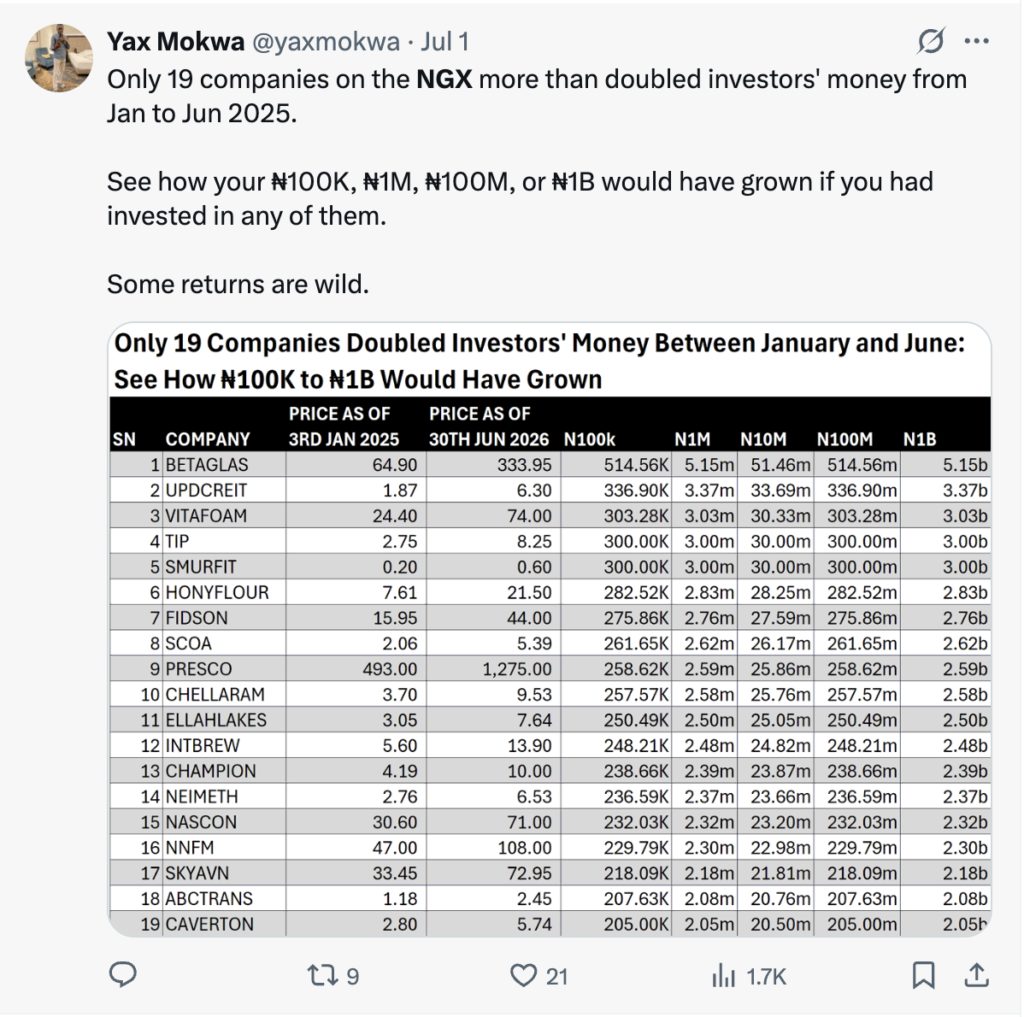
Nigerians are seeking more effective ways to grow their wealth, and the stock market is capturing their attention. You’ve likely seen stories online about people turning small investments into significant gains, or heard about companies on the Nigerian Exchange (NGX) that more than doubled their investors’ money in just a few months.

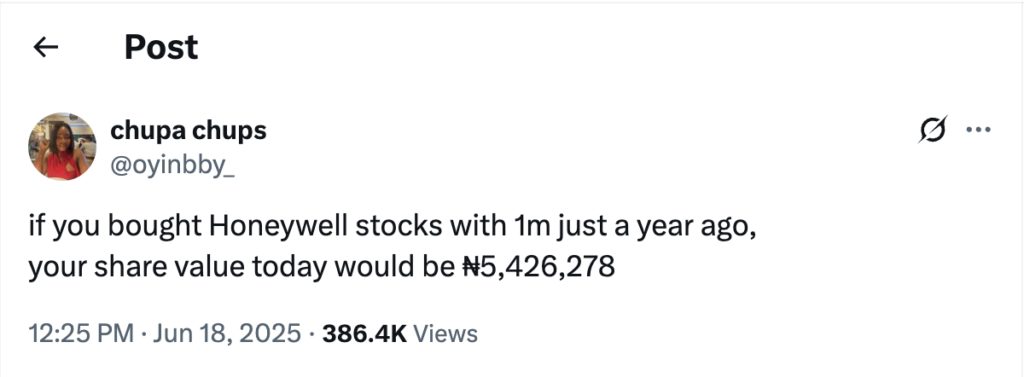
tweet about the Nigerian stock exchange

Image Source: Screenshot of X post by @oyinbby_ highlighting Honeywell stock gains

For example, imagine investing ₦1 million in Honeywell stocks a year ago; today, that investment could be worth over ₦5.4 million. Or consider the companies on the NGX that have doubled or more than doubled in value between January and June 2025 – some returns are truly significant.

tweet about the Nigerian stock exchange

Image Source: Screenshot of X post by @yaxmokwa displaying NGX companies that doubled investor money (Jan-Jun 2025)

This growing interest isn’t surprising. With prices constantly rising, simply saving money is no longer enough. People are looking for more innovative ways to make their money work harder. That’s where stock investing comes in. Instead of just keeping your cash in a bank account, you can now easily put it into shares of companies you believe in.

Apps make this shift straightforward. You no longer need a traditional broker or a suit and tie. All you need is your smartphone and internet to get started.

Nigeria’s fintech sector is also experiencing significant growth. There are over 430 fintech startups in the country, and many of these apps offer stock trading as a core feature. At the same time, the Nigerian Exchange (NGX) is performing well, despite economic challenges. The local stock market has recently reached record highs, attracting local and international investors.

Many Nigerians we spoke with told us they aren’t waiting for the “perfect time” to start investing. As Tolu in Lagos put it: “Once I saw MTN shares going up, I just opened an account and bought a small amount. That ₦5,000 is now like ₦8,000. It’s not a huge amount, but it feels good.”

This mindset is pushing more people to explore apps that offer Nigerian and international stocks. But with so many options, how do you choose the right one?

We examined the top stock investing apps in Nigeria, including Bamboo, Chaka, Trove, and i-invest.  Our review covered their key features, fee structures, and current regulatory standing. More importantly, we engaged with Nigerian users across various states – from new investors to those active since 2020 – who candidly shared their experiences, highlighting what they appreciate, what needs improvement, and which platforms they confidently trust with their investments.

These stock investing apps let you buy stocks on the Nigerian Exchange

Nigerians can easily invest in local and foreign stocks via several apps. We reviewed the most popular ones, checking their licensing and, critically, getting direct feedback from users on how well these platforms truly perform.

1. Bamboo

Bamboo: stock investing apps

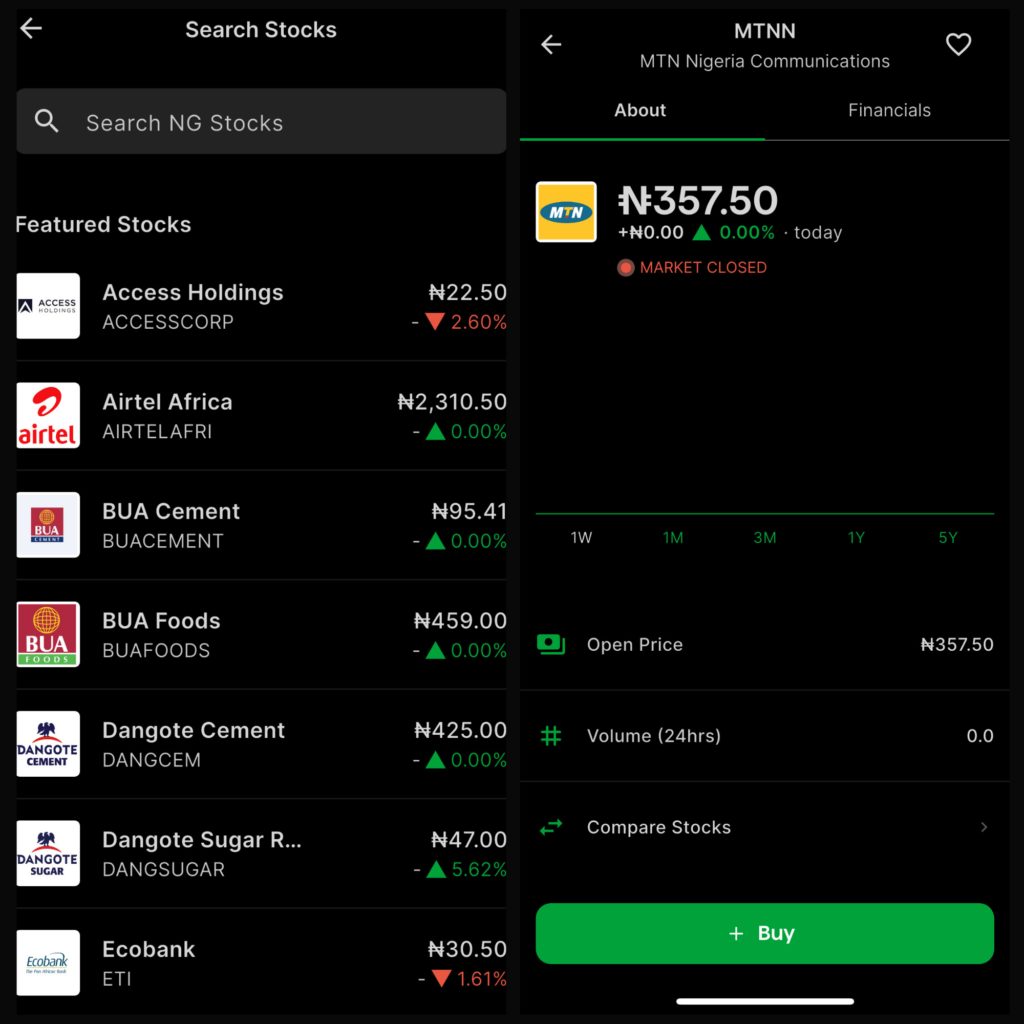
Image Source: Screenshots from the Bamboo app displaying trades for select Nigerian stocks, including MTN

What it lets you do:

Bamboo gives you access to Nigerian and U.S. stocks, and you don’t need a lot of money to start. You can buy fractional shares, meaning you can invest in big companies like Amazon or Tesla with as little as ₦15,000 or $20.

How it’s regulated:

Bamboo is registered with Nigeria’sSecurities and Exchange Commission (SEC) and works with Lambeth Capital for local stock trades. For U.S. stocks, your account is protected by Securities Investor Protection Corporation (SIPC) and Financial Industry Regulatory Authority (FINRA), which means your investments are insured up to $500,000.

What Nigerians told us:

Most people we spoke to praised Bamboo’s clean design and simple setup. Kemi, a user based in Port Harcourt, said:

“Bamboo is my go-to. I started with ₦20k last year, and I’ve just been topping up small small. The app works well, and I’ve never had payment issues.”

However, some also recalled when Bamboo was flagged by regulators in 2021. It caused panic back then, but the company adjusted its model and is now fully licensed. They say they’ve had a better experience since that time.

2. Chaka

Chaka: stock investing apps

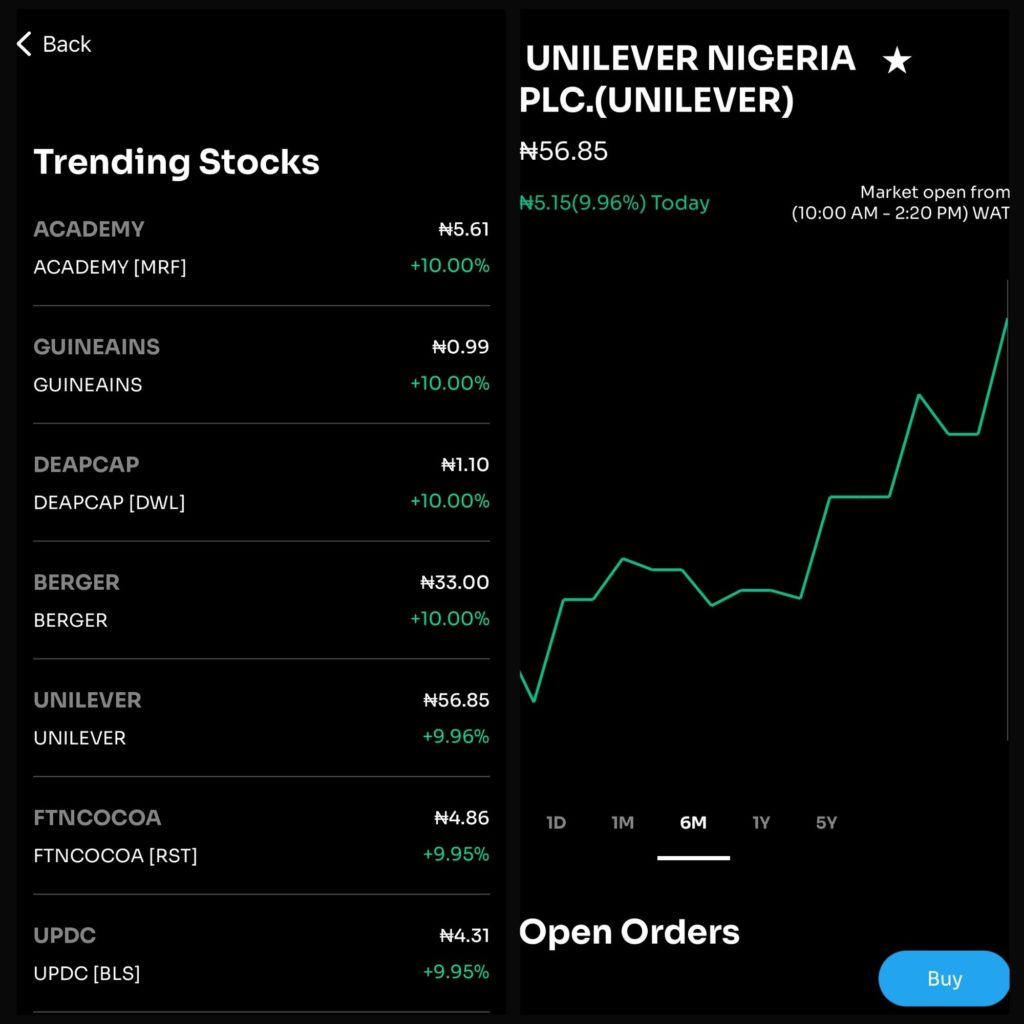
Image Source: Screenshots from the Chaka app displaying trades for select Nigerian stocks, including Unilever Nigeria PLC

What it lets you do:

Chaka gives you access to over 4,000 stocks, including both Nigerian and international ones. You can open a Naira or a Dollar account, depending on your preference. It also features a SmartInvest option, where experts help manage a ready-made portfolio on your behalf. You can start investing with as little as ₦1,000 or $10.

How it’s regulated:

Chaka was one of the first Nigerian apps to get a digital sub-broker license from the SEC. That means they’re legally allowed to offer stock trading to Nigerian users. Their local trades go through Citi Investment Capital.

Fees:

  • Nigerian stocks: ₦100 or 0.5% per trade
  • Foreign stocks: 0.69% to 1.5% per trade
  • No charges for deposits or withdrawals

What Nigerians told us:

We heard mixed reviews. Deji in Ibadan said:

“I like Chaka because it looks serious, and they give regular updates. But getting verified took too long. I had to wait nearly two weeks to start investing.”

Another Lagos-based user, Amaka, added:

“I had to chase customer care for my withdrawal. They eventually sent it, but I switched to Bamboo after that.”

People like the app, but slow Know Your Customer (KYC) and delayed withdrawals are common complaints.

Big news:

Risevest acquired Chaka. Risevest previously faced significant regulatory issues with the Securities and Exchange Commission (SEC) in Nigeria, and is now using Chaka’s license to offer Nigerian stock trading legally. So technically, when you trade NGX stocks on Risevest now, you’re using Chaka’s backend.

3. Trove Finance

What you can do on Trove:

Trove provides access to both Nigerian and U.S. stocks, as well as ETFs, bonds, and ADRs. One of its key selling points is fractional investing, allowing you to start investing without needing to purchase whole shares. You can begin with as little as ₦1,000 or $10, and U.S. stock trades are commission-free. There’s also Trove University, a built-in section with market tips and beginner-friendly content.

How it’s licenced:

For Nigerian stocks, Trove works through Sigma Securities, which is registered with both the SEC and NGX. For U.S. investments, they use Trove Investment Advisers, LLC, a company registered with the U.S. SEC. Additionally, your U.S. account is protected by SIPC insurance, which covers up to $500,000.

Fees:

  • Nigerian stocks: 1.35% per trade
  • Foreign stocks: 1.00% per trade
  • Some advisory accounts may attract a monthly subscription fee, depending on your market.

What Nigerians told us:

We spoke to several investors who said Trove offers one of the widest selections of assets in Nigeria. Kemi in Port Harcourt also said:

“Trove is great for variety. I use it mainly for U.S. stocks and ETFs. The interface works for me.”

But others weren’t as happy. A Lagos-based investor, Sola, shared:

“Their withdrawal process was annoying. It took over a week, and I didn’t get helpful responses from customer care.”

4. i-invest

I-invest: stock investing apps

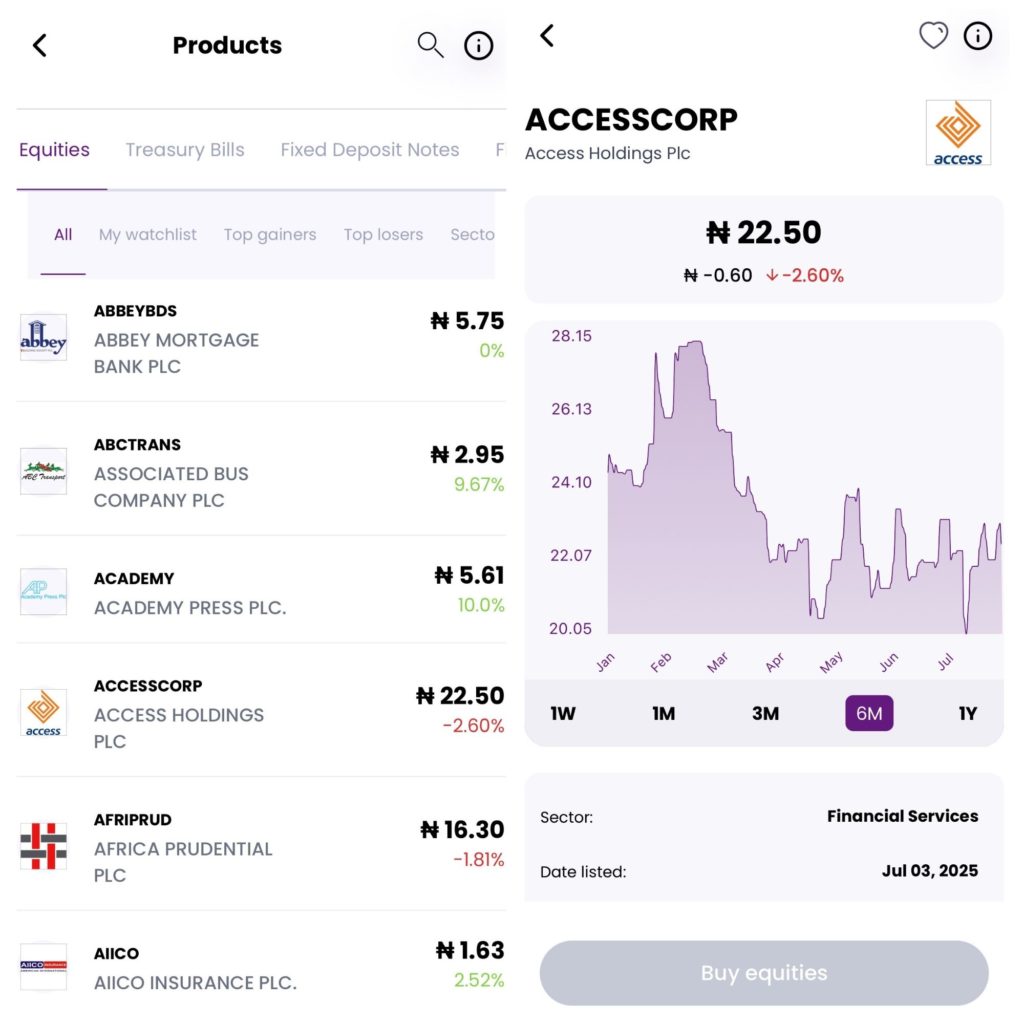
Image Source: Screenshots from the i-invest app displaying trades for select Nigerian stocks, including Access Holdings PLC

What you can do on i-invest:

I-Invest focuses primarily on Nigerian investments, including stocks, Treasury Bills, fixed deposits, commercial papers, and USD-denominated bonds. You can buy shares of companies listed on the Nigerian Exchange (NGX) straight from your phone.

How it’s licenced:

I-invest is registered with the Nigerian SEC, and a licensed custodian holds all investments. The app states that there are no extra charges, but, like every investment in Nigeria, a 10% withholding tax applies to dividend payouts.

What Nigerians told us:

Most people we heard from like how straightforward i-invest is. Deji in Ibadan also said:

“It’s clean and simple. I don’t need to guess what’s happening with my money.”

Another investor, Joy, added:

“I know it doesn’t do foreign stocks, but I use it for T-bills and NGX shares. I like that it doesn’t feel stressful.”

Unlike some other stock investing apps, we didn’t find many complaints about delays or poor service. Investors appreciate the clarity and focus on local assets.

Other platforms Nigerians use to access stocks

Aside from popular stock investing apps like Bamboo and Trove, some Nigerians utilise other tools to invest, particularly those seeking more control, access to multiple markets, or advanced technical features. However, these platforms have significant differences that you should be aware of before diving in.

1. MetaTrader 4 (MT4) & MetaTrader 5 (MT5)

These two platforms are popular worldwide. If you’re deep into trading or have ever seen someone with candlestick charts and multiple indicators, chances are they’re using MT4 or MT5.

MT5 is the newer version, offering more timeframes, improved order execution, and supporting a broader range of assets. Both platforms allow you to use automated trading bots, set price alerts, and customise your trading setup.

But here’s the thing: MetaTrader itself is not a broker. It’s just the software. You still need a licensed broker, such as AvaTrade or NGCB Group, to place trades.

And this is where it gets tricky.

Most of these brokers offer CFD trading, which means you’re not buying actual stocks. You’re simply speculating on whether the price will go up or down. That comes with higher risks, and you’re not entitled to dividends or ownership in the company.

More importantly, many of these brokers are not registered with Nigeria’s SEC. For example, NGCB Group is licensed in Mauritius, not Nigeria. This means if anything goes wrong, you might not be protected under Nigerian investment laws.

A few advanced traders we spoke to in Lagos and Port Harcourt said they use MT5 for forex and global markets, but even they admitted the risks. As Deji, an advanced trader, warned:

“I use MT5 for forex. It’s powerful, but it’s not for everyone. You really need to know what you’re doing. I wouldn’t recommend it to beginners.”

2. EasyEquities

This app is based in South Africa and provides access to a wide range of stocks, including those listed on the JSE (Johannesburg Stock Exchange), as well as the NYSE and Nasdaq. You can also invest in cryptocurrencies, ETFs, and even real estate.

It’s loved for a few reasons:

  • No minimum investment
  • Fractional shares, so you don’t need to buy a whole stock
  • Low brokerage fees — just 0.25% per trade
  • Free EFT deposits, with a small 0.5% FX fee for currency conversion

Sounds great, right? But there’s a catch — EasyEquities is regulated by South Africa’s FSCA, not Nigeria’s SEC. So while Nigerians can open accounts, there are some limitations.

We spoke to a few investors who tried using it from Nigeria. Amaka said:

“I like their fees, but funding the account from Nigeria is stressful. I had to try three banks before my payment worked.”

An investor in Lagos, Tolu, added:

“They didn’t reject my registration, but getting my money back was a hassle. It’s easier to use apps that are made for Nigerians.”

Head-to-head: Comparing stock investing apps in Nigeria

When choosing the right app for investing in stocks in Nigeria, it’s not just about the name or design; what matters most is access, cost, and ease of use. Let’s break it down:

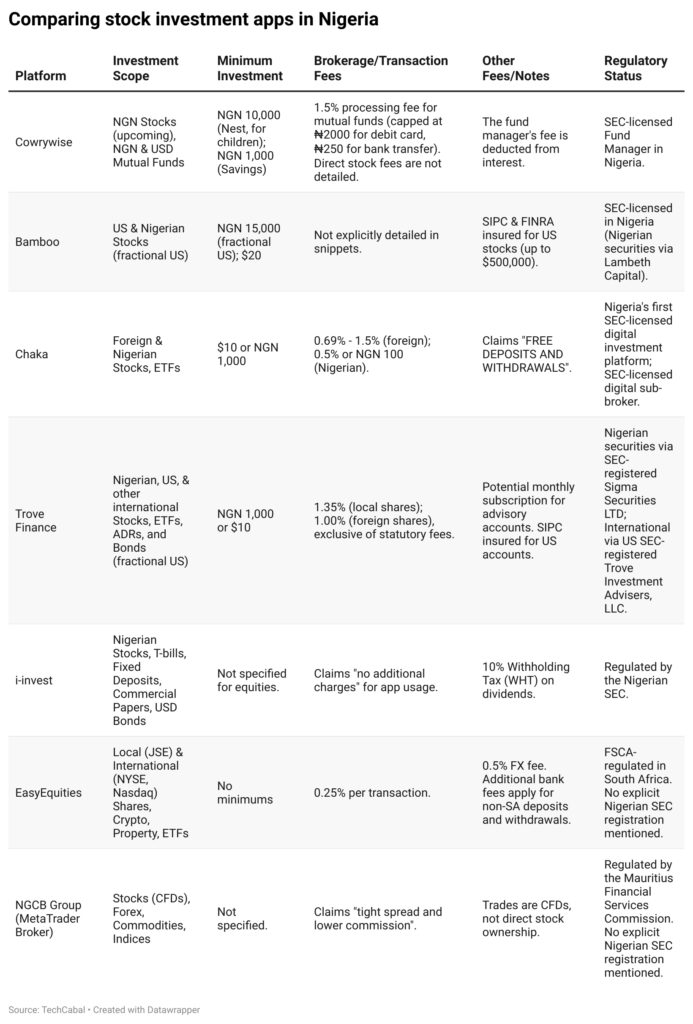
Here is a comparative overview of the fee structures and minimum investments:

comparison of stock investing apps

Note: Statutory fees for Nigerian stock transactions (NGX, CSCS, SEC, Stamp Duty, VAT) apply across all platforms facilitating NGN stock trading, regardless of platform-specific charges. These can total approximately 1.725% for buying and 2.025% for selling.

Final thoughts

Stock investing is no longer just for the few. Across Nigeria, more people are learning how to grow their money, not just save it, and stock investing apps are playing a significant role in that shift.

Here’s what we heard from Nigerians about what truly matters when choosing stock investing apps:

1. Nigerians want options — Local and Foreign

Stock investing apps like Bamboo, Chaka, and Trove already let you buy both Nigerian and U.S. stocks. For many investors we spoke to, this flexibility matters. Some want to invest in companies they see on the news (like Tesla or Apple), while others are focused on Nigerian brands they believe in.

“I like to mix it,” Tolu said. “GTBank is my go-to locally, but I also want to buy Apple shares. I just wish it didn’t take so long to fund my dollar wallet.”

2. Regulation is a big deal — and Nigerians know it

A lot of Nigerians told us they only trust platforms registered with Nigeria’s SEC. After seeing stories about frozen accounts and regulatory drama, many investors now double-check a platform’s license before signing up.

Platforms like i-invest, Chaka, and Bamboo have that stamp of approval. It gives people peace of mind.

“I don’t want to invest and hear tomorrow that the app has issues with the SEC,” Sola said. “That’s my money. I need to be sure it’s protected.”

3. Fees matter — but so does transparency

Nobody likes hidden charges. And while some apps claim “no fees,” Nigerians are becoming more discerning about reading the fine print.

Several investors mentioned confusion around FX fees, statutory taxes, and withdrawal charges. For example, the 10% tax on dividends surprised a few who were unaware that it was standard across all platforms.

“It’s not that I mind paying, I just want to know upfront,” Kemi, a trader we spoke to, said. “Don’t tell me it’s free, then take ₦1,200 from my withdrawal.”

Clear fee breakdowns, upfront costs, and honest communication are now essential for transparency and accountability.

Bottom line

The stock investing space in Nigeria is growing rapidly, and investors are becoming increasingly informed, vocal, and demanding. People want options, speed, and clarity, and the stock investing apps that provide all three will emerge as the winners.

  •