For decades, moving money across African borders was an exercise in friction. A trader in Lagos settling an invoice with...
The post Africa’s Payment Rails Are Being Rebuilt, and the Stakes Are High appeared first on TechTrends Africa.
Table of contents
The types of SASSA social grants
How to apply for the SASSA SRD R350 grant
How to check your SASSA status online
How to change your SASSA banking details
How to change your SASSA phone number
How to check your SASSA balance
SASSA payment dates for October 2025
SASSA child support grant amount for 2025
SASSA old-age grant amount for 2025
The South African Social Security Agency (SASSA) was established by the South African government in 2005 und
The South African Social Security Agency (SASSA) was established by the South African government in 2005 under the Social Assistance Act of 2004, with the primary goal of administering and managing the payment of social assistance grants to the country’s poor and vulnerable citizens.
SASSA handles everything from processing applications and checking eligibility to paying grants and fraud prevention. Its centralised system is designed to make it easier for South Africans to access support once they qualify.
The types of SASSA social grants
SASSA offers different grants depending on your situation. SASSA pays 26-million grants monthly to help reduce poverty and hardship. The central grants include:
Support for children and caregivers
Child Support Grant (CSG): For the primary caregiver of a child under 18.
Foster Child Grant: For people legally appointed as foster parents.
Care Dependency Grant: For caregivers of children under 18 with severe disabilities.
Support for adults
Older Persons Grant: Also known as the state pension, for South Africans aged 60 and above.
Disability Grant: For individuals aged 18 to 59 with a disability that prevents them from working.
War Veteran’s Grant: For former members of the armed forces.
Grant-in-Aid: Extra support for people already receiving a central grant but who need full-time care.
Temporary support
Social Relief of Distress (SRD) Grant: Often called the SASSA R350 grant, this temporary grant is for unemployed people with no other source of income or social assistance.
How to apply for the SASSA SRD R350 grant
The Social Relief of Distress (SRD) grant, often called the SASSA R350 grant, was first introduced during the COVID-19 pandemic to help unemployed South Africans. In 2025, the amount has increased to R370 per month. This shows that the government now treats it as more than just short-term help; it is ongoing support for people without income.
Eligibility requirements for 2025
To qualify for the SRD grant in 2025, you must meet these conditions:
Be a South African citizen, permanent resident, refugee, asylum seeker, or special permit holder living in South Africa.
Be between 18 and 60 years old.
Be unemployed and not receiving any other SASSA grant, UIF payments, or NSFAS funding.
Pass the means test, which checks that your monthly income is R624 or less.
Step-by-Step online application (2025)
You can only apply online. Applications are free, and SASSA warns people not to pay anyone to apply on their behalf. Here’s how to do it:
Select your ID type: Choose if you’re a South African ID holder or applying with an asylum/special permit.
Enter your phone number: You’ll get a One-Time Pin (OTP) to confirm your identity.
Fill in your details: Provide your ID number, full name, and contact information.
Choose a payment method: Payments can go into your bank account or be collected at stores like Pick n Pay or Shoprite.
Submit your application: Double-check your details before submitting. SASSA will then check your financial records against government and banking databases.
How to check your SASSA status online
After applying, you’ll want to know if your grant is approved and when payments will be made. You can check your SASSA SRD status using any of these official methods:
SRD website: Visit srd.sassa.gov.za, enter your ID number and phone number, and view your application status.
WhatsApp: Send “status†to 082 046 8553, then follow the prompts.
USSD code: Dial 1347737# on your phone, then enter your details.
SASSA Call Centre: Call 0800 60 10 11 to speak with an agent who will verify your details and confirm your status.
Moya App: Download the Moya App to check your SRD status without using mobile data.
How to change your SASSA banking details
Keeping your SASSA banking details up to date is essential to avoid interruptions in your grant payments. The update process depends on the type of grant: SRD grant recipients can update details online, while those on permanent grants — such as the Older Person’s Grant, Disability Grant, or Child Support Grant — must visit a SASSA office.Â
Changing banking details for the SRD grant (Online)
If you are an SRD grant beneficiary, you can update your banking details through the official SRD website. Here’s how:
Provide your new bank name, account number, and any other required details. Double-check for accuracy to avoid payment delays.
An OTP will be sent to your registered mobile number. Enter it to confirm.
Submit your changes and wait for a confirmation message.
Changing banking details for permanent grants (In person)
For permanent grants, the process is manual. You’ll need to go to a SASSA office with the proper documents.
Collect the SASSA banking details change form from their website or any SASSA office.
Fill it out with your personal details and new account information.
Attach a certified copy of your ID plus a bank statement or a letter from your bank confirming your account.
Submit everything at a SASSA office and keep copies for yourself.
How to change your SASSA phone number
Your phone number is just as significant as your bank details. SASSA uses it for verification, OTPs, and updates about your grant. If you change your number, please update it with SASSA as soon as possible.
Updating your number online
You can do this through the SASSA Services Portal:
Save the changes. An OTP will be sent to your new number. Enter it to confirm.
If you lose access to your number
If you no longer have access to your registered number, you cannot update it online. In this case, you must go to a SASSA office in person to make the change.
How to check your SASSA balance
You cannot check your SASSA balance directly on the official website. Banks and payment partners handle balance checks. Here are the most common ways:
ATM: Check your balance at any ATM (some banks may charge a small fee).
Retail stores: At Shoprite, Pick n Pay, Boxer, and other approved stores, you can ask for a balance check at the till.
SMS (Postbank users): Send BAL + last four digits of your account number to 32302. You’ll get your balance via SMS. This costs R1.00.
USSD (EasyPay Everywhere users): Dial *120*3737# and follow the prompts to view your balance.
SASSA payment dates for October 2025
SASSA releases grants on set days each month to avoid overcrowding at pay points, ATMs, and stores. Payments are made on working days only. If a date falls on a weekend or public holiday, the money becomes available on the previous working day.
Older Persons’ / Pensioners’ Grant: Thursday, 2 October 2025
Disability Grant: Friday, 3 October 2025
All Other Grants (including Child Support Grant): Monday, 6 October 2025
Funds stay in your account until you withdraw them. There is no need to rush on the first day.
SASSA child support grant amount for 2025
The Child Support Grant (CSG) helps caregivers cover the cost of raising children. In 2025, the monthly amount is R560 per child. Caregivers of orphaned children can also receive a top-up, which increases the monthly payment to R810 per child.
Who is eligible for the Child Support Grant?
To qualify, both you and the child need to meet certain conditions:
Caregiver requirements:
You must be a South African citizen, permanent resident, or refugee.
You must be the main person responsible for the child, such as a parent, grandparent, or relative.
Your income must pass the means test: if you are single, you must earn less than R52,800 a year. If you are married, your combined income must be under R105,600 a year.
Child requirements:
The child must be under 18.
The child must not live in a state institution.
Both you and the child must live in South Africa.
SASSA old-age grant amount for 2025
The Older Person’s Grant, also known as the state pension, provides financial support to South Africans who have reached retirement age. For 2025, the grant is set at:
R2,315 per month for beneficiaries under 75
R2,335 per month for beneficiaries aged 75 and older
Who qualifies for the Old Age Grant?
To receive the Older Person’s Grant, you must meet these requirements:
Be 60 years or older
Be a South African citizen, permanent resident, or refugee living in South Africa
Not receive another social grant or live in a state-funded institution
Means test: Your income and assets will be reviewed to confirm your qualification. The grant is intended for individuals who are unable to support themselves fully.
It is important to note that if an applicant is married, the combined income and assets of both spouses are assessed jointly.
Key points for beneficiaries in 2025
Here are the most important updates you should know:
The SRD grant remains at R370 per month, and applications are done only online.
You can check your SASSA status through the website, WhatsApp, or USSD.
Banking detail changes depend on your grant type. SRD beneficiaries update details online, while permanent grant beneficiaries must go to a SASSA office.
Your phone number is central to your profile. If you lose it, you must visit a SASSA office to update it.
October 2025 payment dates: Older Persons’ Grant on 2 October, Disability Grant on 3 October, and all other grants (including Child Support) on 6 October.
The Child Support Grant is R560 per child or R810 with the orphan top-up.
The Older Person’s Grant is R2,315 per month, with R2,335 for those aged 75 and above.
In two weeks, October begins, and that means millions of South Africans will turn to digital systems to access their South African Social Security Agency (SASSA) grant payments. As new payment dates roll out in the coming month, it is crucial for recipients, especially older people and those in rural areas, to understand the digital tools for checking balances, updating banking details, and tracking grant disbursements.SASSA grants are paid on specific dates to ensure a smooth process for recip
In two weeks, October begins, and that means millions of South Africans will turn to digital systems to access their South African Social Security Agency (SASSA) grant payments. As new payment dates roll out in the coming month, it is crucial for recipients, especially older people and those in rural areas, to understand the digital tools for checking balances, updating banking details, and tracking grant disbursements.
SASSA grants are paid on specific dates to ensure a smooth process for recipients. For October 2025, the payment schedule is as follows:
Older Persons Grant: October 2, 2025
Disability Grant: October 3, 2025
Children’s and Other Grants: October 6, 2025
The October 6 date covers key grants such as the child support, foster care, care dependency, and more. SASSA stresses that funds remain available for collection even after these official dates; beneficiaries do not need to rush on the exact day.
How to change banking details for SASSA
Postbank’s contract with SASSA officially ends on 30 September 2025. This termination date was confirmed by SASSA and communicated to Parliament, with assurance that grant payments will continue for all beneficiaries without disruption after the contract expires. SASSA cards, if still active, work at all ATMs, but a personal bank account is necessary as Postbank support phases out. SASSA urges beneficiaries to migrate to a preferred bank or retailer payment option and update records using secure official methods, which are explored in detail below.
Online update (SRD and general grants)
The online process works for the SRD grant and standard or general grants like Old Age, Disability, Child Support, Foster Child, and Care Dependency grants. Beneficiaries of these grants can change their banking details quickly using SASSA’s website or online portal.
Select the relevant option: “change my banking detailsâ€
Enter your South African ID number and registered mobile number.
You will receive an SMS with a secure link. Use it to update your new bank account details (bank name, account number, branch code, account type), and confirm via OTP.
Submit and wait for confirmation; future grant payments will be made to your new bank account.
In-person update (all grant types)
The in-person method at SASSA offices is available for every grant type, including those not covered by online systems or where special documentation or assistance is required. This method supports not only SRD and general grants, but also niche grants like Grant-in-Aid, War Veterans Grant, and cases where online channels cannot be used due to access, identity verification problems, or unique circumstances.
Go to your nearest SASSA office.
Take your ID, proof of your new bank account (stamped bank statement or letter from the bank), and complete the SASSA banking detail change form.
Fill out the form at the office, attach your supporting documents, and submit to a SASSA official.
The change will be processed, and you will receive confirmation; your next grant will be paid into your new account.
Verification for banking details typically takes 4 to 10 working days, and successful updates apply to future payments only.
How to check SASSA balance
Beneficiaries can check their SASSA grant balances using various methods. Also, now that Postbank will soon end its payment partnership, beneficiaries can use alternative methods. The most reliable options are:
USSD codes (mobile)
Dial 1203210# or 12069277# from the mobile number registered with SASSA, and follow prompts to see the balance. This method works on any basic cellphone and does not require airtime or data.
SASSA online portal
Log in at srd.sassa.gov.za or the official SASSA site, enter grant details, and view balance instantly if you have internet access.
WhatsApp support
Save SASSA’s WhatsApp number (082 046 8553). Send “SASSA†and then “STATUS†to receive step-by-step prompts, after which the current balance will be provided.
ATM and retail stores
If you have switched to a bank account or retailer card (e.g., Pick n Pay, Shoprite, Boxer, Checkers), use the card at any ATM or ask the cashier at participating retailers for a balance enquiry.
In-person at SASSA offices
Visit the nearest SASSA office for personalised balance assistance, using your ID and grant card.
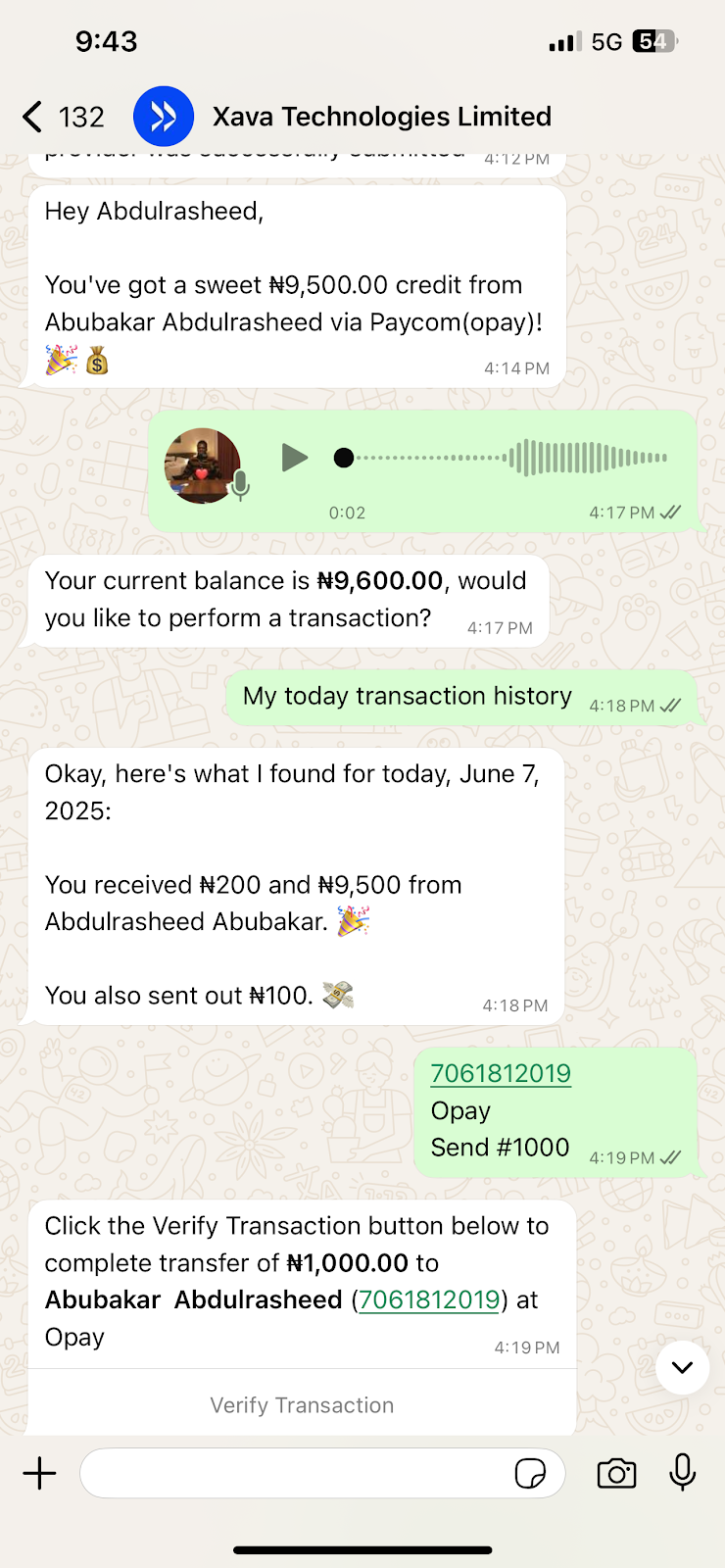
As mobile banking adoption surges across Nigeria, users demand faster and simpler ways to manage their money, without switching apps or dealing with clunky interfaces. Xara, a new WhatsApp-based AI assistant, is promising to change that.
Xara, a multimodal artificial intelligence banking bot launched in June by Nigerian software engineer Sulaiman Adewale, allows people to send money, pay bills, and analyse spending as naturally as texting a friend. The bot is built entirely inside WhatsApp, u
As mobile banking adoption surges across Nigeria, users demand faster and simpler ways to manage their money, without switching apps or dealing with clunky interfaces. Xara, a new WhatsApp-based AI assistant, is promising to change that.
Xara, a multimodal artificial intelligence banking bot launched in June by Nigerian software engineer Sulaiman Adewale, allows people to send money, pay bills, and analyse spending as naturally as texting a friend. The bot is built entirely inside WhatsApp, used by 95% of Nigeria’s 31.6 million social media users.
“I wanted an easier way that carries everybody along in banking, and if you look at it properly, you will see that WhatsApp is what even the oldest people among us use,” Adewale told TechCabal.
The product enters Nigeria’s crowded fintech space with a different approach: cut out the friction and build on top of what consumers already use. The company considers Owo, an AI managed by Mono and designed to facilitate payments on WhatsApp, as its closest competitor.
According to Adewale, Xara is powered by an existing large language model (LLM), the same underlying technology behind generative AI tools like ChatGPT. It is also trained on images and voices, especially accented Nigerian speech patterns, using open-source data tailored to its specific use case.
The AI understands commands in natural language, interprets them appropriately to confirm details, and processes the transaction in real time. “Send ₦10,000 to Abubakar for breakfast,” a user might chat this with the AI, and it will process.
“We have focused on just pidgin and English, but we are currently working on it to make it even understand our local languages like Hausa and Yoruba,” said Adewale.
To make the AI a personal financial assistant, users add their WhatsApp number, and once onboarded, they are linked to a payment source, currently 9 Payment Service Bank (9PSB), which issues user account numbers. Adewale said the team is working on partnering with more banks, so users can choose their preferred bank.
TechCabal tested the AI bot for two weeks and found that it understands and can process transactions with images, voice notes, text, and can analyse user spending and schedule payments. It remembers conversions with users and is capable of saving recipients as beneficiaries.
About 10,000 users have been registered on the platform, and over ₦135 million ($88,200) worth of transactions have been recorded within the two weeks of its launch, Adewale claims. He added that his team is currently working on partnerships with other banks as its initial payment provider, 9PSB, could no longer handle the inflow of new users, causing it to pause new registrations
Stella Adeboye, a server at Kilimanjaro restaurant in Ilorin, said Xara could serve as an alternative for easy payment for customers who had to raise their heads multiple times to check account details on the wall to make transfers for bill payment.
“If this tool can take a picture of an account number and process the transfer instantly, I think it would help us and also make payments much easier for customers,” Adeboye said.
To its early users, how their personal and financial data are secured has been a major concern. “Being able to bank via WhatsApp without opening another app is convenient, since it works even on a low network connection,” said Babatunde Hassan, one of the users. “But I’m worried about how our information is secured, and I’m sure that doubt may also hold other people back.”
In response to how users’ data is secured, Adewale said that the AI is built to use WhatsApp’s existing end-to-end encryption to safeguard users’ data. This means that conversations are private and inaccessible to third parties. He also noted that it requires an optional 4-digit authentication PIN to authorise transactions to beat fraud or compromise accounts.
“We don’t retain those personal banking details ourselves; the only data we log is related to payment transactions, just for tracking and resolution purposes, if any issues arise,” he said. “For extra security, we advise users to lock their WhatsApp using Face ID or a password, or even lock their chats with the AI to keep transactions private.”
Adewale explained that in case of a WhatsApp account breach or lost phone, users can visit its customer support to “request that your account be blocked instantly.” Accounts can be reinstated once identification is provided.
When asked about the type of licensing governing their multimodal AI service, Adewale stated that they currently “rely on banking partners’ license” for regulatory cover, indicating functions through existing compliance frameworks held by its financial institution partners.
A game changer for financial inclusion?
According to the Central Bank of Nigeria (CBN), over 28 million Nigerians lack access to financial products and services, including money transfer services, despite the country’s financial exclusion rate dropping from 46.3% in 2010 to around 26% in 2023.
Financial analyst Victor Daniel said leveraging WhatsApp for banking services could encourage even further financial inclusion, especially since the platform works on low-end smartphones despite poor network connections.
“In the past years, fintech innovations have helped reduce the financial exclusion in the country, but we need more innovations like this that can give us more alternatives to traditional systems to achieve more financial inclusion,” he said.
Daniel added that tools like Xara may also offer a strong alternative to QR code payments, which have seen limited adoption in Nigeria due to technical know-how and fraud concerns. “By allowing users to simply snap an account number from a note or screen and initiate a transfer through natural language, that provides a simpler payment service.”
While the focus is currently on Nigeria, Adewale said he envisions Xara AI banking assistant reaching more African countries where WhatsApp is dominant and banking remains a challenge. He also bets that the tool will disrupt the fintech landscape and “replace a lot of fintechs, hopefully.”
“We are still working on integrating additional services like savings plans, utility payment, and even e-commerce and logistics, like telling it to order food for you, and it will still do.”
Mark your calendars! Moonshot by TechCabal is back in Lagos on October 15–16! Join Africa’s top founders, creatives & tech leaders for 2 days of keynotes, mixers & future-forward ideas. Early bird tickets now 20% off—don’t snooze! moonshot.techcabal.com
Kenya’s digital payments infrastructure is growing. But growth alone is not enough. Without open, affordable, and interoperable systems, the promise...
Source
Kenya’s digital payments infrastructure is growing. But growth alone is not enough. Without open, affordable, and interoperable systems, the promise...

 Connexion